

If you’ve ever faced the challenge of extracting Exchange mailboxes data from an offline EDB file, you know how painful the process can be. PowerShell cmdlets fail, native tools have limitations, and the risk of data loss is always looming. That’s exactly where Stellar Converter for EDB steps in and after testing it hands-on, I can say it genuinely delivers on its promises.
In this review, I’ll walk you through everything you need to know about Stellar Converter for EDB — features, performance, pricing, and whether it’s worth your money.
” Stellar Converter for EDB eliminates the complexity of extracting mailbox data from Exchange databases. What once required extensive manual effort can now be accomplished in a fraction of the time, with accurate conversion and export of mailbox data while maintaining complete data integrity. “
What is Stellar Converter for EDB?
Stellar Converter for EDB is a professional tool from Stellar Data Recovery – a company with over 30 years of experience in data recovery and email migration tools. The software converts offline or hosted Exchange Database (EDB) files into Outlook PST format, and can also directly export mailboxes to a live Exchange Server or Microsoft 365.
It’s trusted by IT administrators, Microsoft MVPs, and enterprise teams worldwide, and has been reviewed and awarded by TechGenix, CHIP, 4sysops, and Softpedia.
Key Features
After spending time with the software, here’s my honest take on each major feature and what it actually means in practice:
1. No File Size Limit — And It Actually Means It
Most EDB conversion tools advertise “large file support” but start crawling or throwing errors once you cross the 10GB mark. Stellar Converter for EDB handled the test EDB file without any slowdown or warnings. For enterprise IT teams dealing with years of accumulated Exchange data, this is not a nice-to-have — it’s essential. The tool simply loads, scans, and processes without complaint.
2. Parallel Processing — The Feature That Saves Real Time
This is the one feature that genuinely impressed me. Processing up to 8 mailboxes simultaneously might sound like a minor technical detail, but in practice it’s the difference between a 2-hour conversion and an all-day job. I watched it work through multiple mailboxes at once in the test environment — the progress bars running side by side made it immediately clear why enterprise IT teams favour this tool over manual alternatives.
” Stellar Converter for EDB eliminates the complexity to convert EDB file to PST format. What used to take days of PowerShell scripting and manual verification now takes hours — with full confidence that no mailbox data is lost in the process. “
3. Direct Export to Microsoft 365 — No Middle Steps
Most Export workflows involve converting to PST first, then importing into Microsoft 365 — two separate operations with two separate chances for something to go wrong. Stellar Converter for EDB skips that entirely with direct EDB-to-M365 export. The automatic mailbox mapping feature is particularly well thought out — it matches source mailboxes to destination accounts without manual intervention, which removes the most error-prone part of any conversion project.
4. Archive Mailbox Support — Often Overlooked, Here It’s Handled
I was specifically looking for this because archive mailbox support is where a lot of cheaper tools fall short. Stellar Converter for EDB handles both primary and archive mailboxes in the same operation, which means you’re not doing two separate passes through your EDB file. For organizations with compliance requirements around archived emails, this is the feature that makes the difference.
5. Full Preview Before Export — Verify Before You Commit
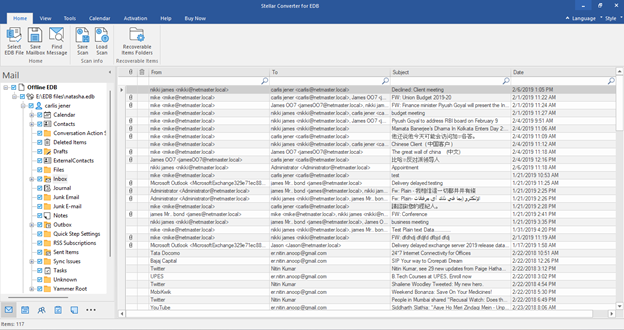
The preview interface is genuinely useful rather than just a checkbox feature. It renders emails, contacts, calendar entries, and attachments in an Outlook-style tree view before you export anything. This matters because it lets you spot data integrity issues early — missing attachments, missing items, or wrong folder mappings — before they become problems in production. I verified several items in the test EDB and everything rendered cleanly with formatting intact.
6. Mailbox Priority Queue — Thoughtful Enterprise Design
This is a small feature that shows Stellar Converter for EDB understands how enterprise EDB file conversion actually work. When you’re moving 200 mailboxes, the CEO’s email cannot wait until the system gets to the letter C alphabetically. The priority queue lets IT teams specify which mailboxes migrate first — executives, critical departments, or active users — while the rest process in the background. It sounds simple but it’s the kind of detail that prevents 2am phone calls.
7. Multiple Export Formats — PST Is Not Always the Answer
Beyond PST, the tool exports to EML, MSG, HTML, RTF, and PDF. In practice this means legal teams can get emails as PDFs for evidence purposes, developers can work with MSG files programmatically, and archival teams can use HTML for long-term readable storage. The flexibility here is genuine — each format opens up different downstream workflows that a PST-only tool simply cannot support.
My Experience Testing the Software
I tested Stellar Converter for EDB using the offline EDB file The installation was straightforward the setup wizard took less than 2 minutes to complete on a Windows 11 system.
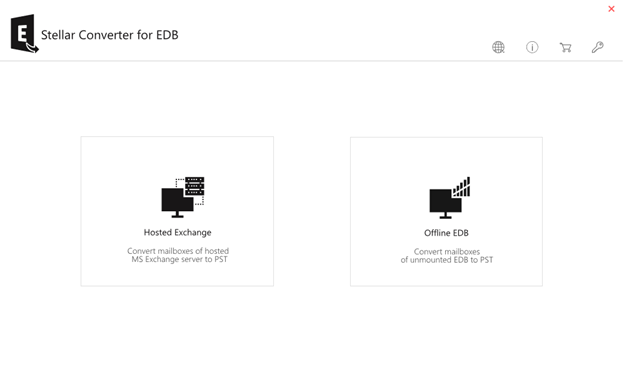
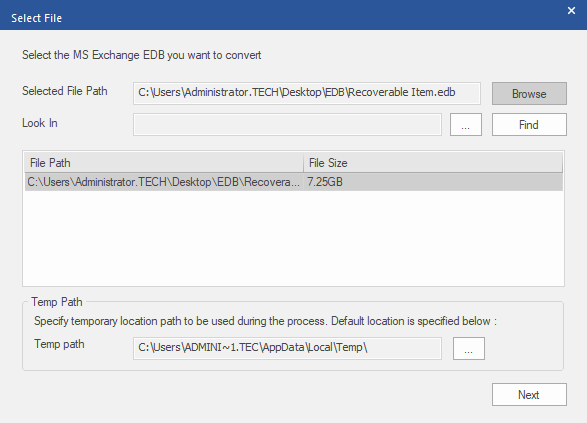
After loading the EDB file, the software scanned it quickly and presented a clean Outlook-style tree view of all mailboxes.
I could immediately see emails, contacts, calendar entries, and folders all with their original formatting intact. The preview panel was smooth and responsive, making it easy to verify content before exporting.
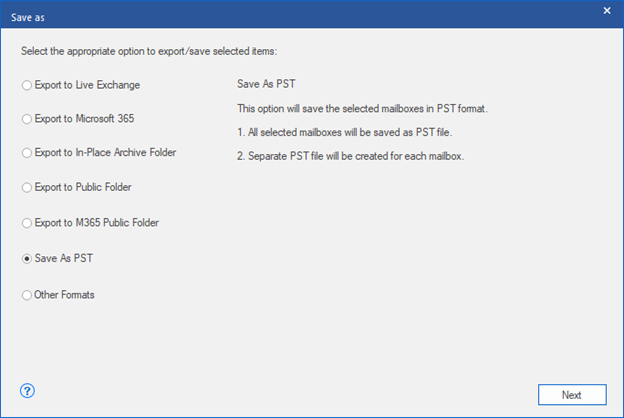
Exporting to PST was just a few clicks — select mailboxes, choose PST format, pick a destination, and hit Save. The conversion completed without errors, and the resulting PST imported into Outlook perfectly.
What impressed me most was the parallel processing — it visibly processed multiple mailboxes simultaneously, which would save significant time in a real-world enterprise conversion process.
Pricing
Stellar Converter for EDB is available in three editions:
- Corporate ($299) — Converts up to 50 mailboxes. Ideal for small to mid-sized organizations.
- Technician ($399) — Converts up to 500 mailboxes. For IT service providers handling multiple clients.
- Toolkit ($699) — Unlimited mailboxes, plus Exchange Repair, OST to PST, and more. Best value for enterprise teams.
All editions include a free trial that lets you scan and preview the converted data before purchasing.
System Requirements
- Windows 11, 10, 8.1, 8 or Windows Server 2012–2022 (64-bit only)
- Intel-compatible x64 processor
- 8 GB RAM minimum
- 250 MB free disk space
- MS Office installed (required for saving PST files)
Pros and Cons
✅ Pros
- No file size limitation handles even large EDB databases
- Parallel processing significantly speeds up conversion
- Supports direct export to live Exchange and Microsoft 365
- Archive mailbox and public folder support
- Clean, intuitive Outlook-style interface
- Multiple export formats (PST, EML, MSG, HTML, RTF, PDF)
- Free trial available with full preview
- Trusted by Microsoft MVPs for over 30 years
- ISO 9001 and ISO 27001 certified
❌ Cons
- Corporate edition limits you to 50 mailboxes — large organization may need Technician or Toolkit
- Online mode requires Exchange admin rights
Who Should Use Stellar Converter for EDB?
- IT Administrators exporting mailboxes from Offline EDB to Microsoft 365
- MSPs and IT consultants handling email migrations for clients
- Enterprises decommissioning older Exchange servers
- Anyone where PowerShell cmdlets have failed or are too complex
Verdict
Stellar Converter for EDB is a solid EDB to PST Converter tool that does exactly what it claims. The conversion accuracy is excellent, the interface is clean, and features like parallel processing and direct Microsoft 365 export make it genuinely useful for real-world enterprise scenarios.
“For organizations decommissioning legacy Exchange servers or moving to Microsoft 365, having a tool that handles offline EDB files without size restrictions is not just convenient — it’s essential. Stellar Converter for EDB delivers exactly that.”
If you’re dealing with an Exchange database conversion, from an offline EDB, or simply need a reliable PowerShell alternative Stellar Converter for EDB is worth every dollar. The free trial lets you verify the results before spending a penny, which removes all the risk.
Rating: 4.5/5
