

When you want to run frontier models locally, you hit the same constraints repeatedly.
Cloud APIs lock you into specific providers and pricing structures. Every inference request leaves your environment. Sensitive data, proprietary workflows, internal knowledge bases – all of it goes through someone else’s infrastructure. You pay per token whether you need the full model capabilities or not.
Self-hosting gives you control, but integration becomes the bottleneck. Your local model works perfectly in isolation, but connecting it to production systems means building your own API layer, handling authentication, managing routing, and maintaining uptime. A model that runs beautifully on your workstation becomes a deployment nightmare when you need to expose it to your application stack.
Hardware utilization suffers in both scenarios. Cloud providers charge for idle capacity. Self-hosted models sit unused between bursts of traffic. You’re either paying for compute you don’t use or scrambling to scale when demand spikes.
Google’s Gemma 4 changes one part of this equation. Released April 2, 2026 under Apache 2.0, it delivers four model sizes (E2B, E4B, 26B MoE, 31B dense) built from Gemini 3 research that run on your hardware without sacrificing capability.
Clarifai Local Runners solve the other half: exposing local models through production-grade APIs without giving up control. Your model stays on your machine. Inference runs on your GPUs. Data never leaves your environment. But from the outside, it behaves like any cloud-hosted endpoint – authenticated, routable, monitored, and ready for integration.
This guide shows you how to run Gemma 4 locally and make it accessible anywhere.
Why Gemma 4 + Local Runners Matter
Built from Gemini 3 Research, Optimized for Edge
Gemma 4 isn’t a scaled-down version of a cloud model. It’s purpose-built for local execution. The architecture includes:
- Hybrid attention: Alternating local sliding-window (512-1024 tokens) and global full-context attention balances efficiency with long-range understanding
- Dual RoPE: Standard rotary embeddings for local layers, proportional RoPE for global layers – enables 256K context on larger models without quality degradation at long distances
- Shared KV cache: Last N layers reuse key/value tensors, reducing memory and compute during inference
- Per-Layer Embeddings (E2B/E4B): Secondary embedding signals feed into every decoder layer, improving parameter efficiency at small scales
The E2B and E4B models run offline on smartphones, Raspberry Pi, and Jetson Nano with near-zero latency. The 26B MoE and 31B dense models fit on single H100 GPUs or consumer hardware through quantization. You’re not sacrificing capability for local deployment – you’re getting models designed for it.
What Clarifai Local Runners Add
Local Runners bridge local execution and cloud accessibility. Your model runs entirely on your hardware, but Clarifai provides the secure tunnel, routing, authentication, and API infrastructure.
Here’s what actually happens:
- You run a model on your machine (laptop, server, on-prem cluster)
- Local Runner establishes a secure connection to Clarifai’s control plane
- API requests hit Clarifai’s public endpoint with standard authentication
- Requests route to your machine, execute locally, return results to the client
- All computation stays on your hardware. No data uploads. No model transfers.
This isn’t just convenience. It’s architectural flexibility. You can:
- Prototype on your laptop with full debugging and breakpoints
- Keep data private – models access your file system, internal databases, or OS resources without exposing your environment
- Skip infrastructure setup – No need to build and host your own API. Clarifai provides the endpoint, routing, and authentication
- Test in real pipelines without deployment delays. Inspect requests and outputs live
- Use your own hardware – laptops, workstations, or on-prem servers with full access to local GPUs and system tools
Gemma 4 Models and Performance
Model Sizes and Hardware Requirements
Gemma 4 ships in four sizes, each available as base and instruction-tuned variants:
| Model | Total Params | Active Params | Context | Best For | Hardware |
|---|---|---|---|---|---|
| E2B | ~2B (effective) | Per-Layer Embeddings | 256K | Edge devices, mobile, IoT | Raspberry Pi, smartphones, 4GB+ RAM |
| E4B | ~4B (effective) | Per-Layer Embeddings | 256K | Laptops, tablets, on-device | 8GB+ RAM, consumer GPUs |
| 26B A4B | 26B | 4B (MoE) | 256K | High-performance local inference | Single H100 80GB, RTX 5090 24GB (quantized) |
| 31B | 31B | Dense | 256K | Maximum capability, local deployment | Single H100 80GB, consumer GPUs (quantized) |
The “E” prefix stands for effective parameters. E2B and E4B use Per-Layer Embeddings (PLE) – a secondary embedding signal feeds into every decoder layer, improving intelligence-per-parameter at small scales.
Benchmark Performance
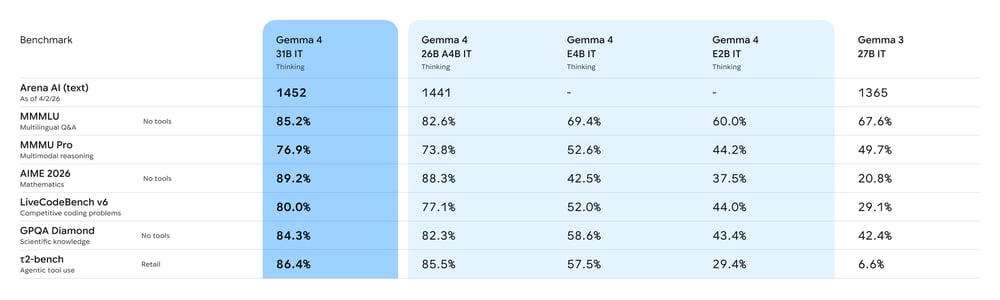
On Arena AI’s text leaderboard (April 2026):
- 31B: #3 globally among open models (ELO ~1452)
- 26B A4B: #6 globally
Academic benchmarks:
- BigBench Extra Hard: 74.4% (31B) vs 19.3% for Gemma 3
- MMLU-Pro: 87.8%
- HumanEval coding: 85.2%
Multimodal capabilities (native, no adapter required):
- Image understanding with variable aspect ratio and resolution
- Video comprehension up to 60 seconds at 1 fps (26B and 31B)
- Audio input for speech recognition and translation (E2B and E4B)
Agentic features (out of the box):
- Native function calling with structured JSON output
- Multi-step planning and extended reasoning mode (configurable)
- System prompt support for structured conversations
Setting Up Gemma 4 with Clarifai Local Runners
Prerequisites
- Ollama installed and running on your local machine
- Python 3.10+ and pip
- Clarifai account (free tier works for testing)
- 8GB+ RAM for E4B, 24GB+ for quantized 26B/31B models
Step 1: Install Clarifai CLI and Login
Log in to link your local environment to your Clarifai account:
Enter your User ID and Personal Access Token when prompted. Find these in your Clarifai dashboard under Settings → Security.
Step 2: Initialize Clarifai Local Runner
Configuration options:
--model-name: Gemma 4 variant (gemma4:e4b,gemma4:31b,gemma4:26b)--port: Ollama server port (default: 11434)--context-length: Context window (up to 256000 for full 256K support)
Example for 31B with full context:
This generates three files:
- model.py – Communication layer between Clarifai and Ollama
- config.yaml – Runtime settings, compute requirements
- requirements.txt – Python dependencies
Step 3: Start the Local Runner
(Note: Use the actual directory name created by the init command, e.g., ./gemma-4-e4b or ./gemma-4-31b)
Once running, you receive a public Clarifai URL. Requests to this URL route to your machine, execute on your local Ollama instance, and return results.
Running Inference
Set your Clarifai PAT:
Use the standard OpenAI client:
That’s it. Your local Gemma 4 model is now accessible through a secure public API.
From Local Development to Production Scale
Local Runners are built for development, debugging, and controlled workloads running on your hardware. When you’re ready to deploy Gemma 4 at production scale with variable traffic and need autoscaling, that’s where Compute Orchestration comes in.
Compute Orchestration handles autoscaling, load balancing, and multi-environment deployment across cloud, on-prem, or hybrid infrastructure. The same model configuration you tested locally with clarifai model serve deploys to production with clarifai model deploy.
Beyond operational scaling, Compute Orchestration gives you access to the Clarifai Reasoning Engine – a performance optimization layer that delivers significantly faster inference through custom CUDA kernels, speculative decoding, and adaptive optimization that learns from your workload patterns.
When to use Local Runners:
- Your application processes proprietary data that cannot leave your on-prem servers (regulated industries, internal tools)
- You have local GPUs sitting idle and want to use them for inference instead of paying cloud costs
- You’re building a prototype and want to iterate quickly without deployment delays
- Your models need to access local files, internal databases, or private APIs that you can’t expose externally
Move to Compute Orchestration when:
- Traffic patterns spike unpredictably and you need autoscaling
- You’re serving production traffic that requires guaranteed uptime and load balancing across multiple instances
- You want traffic-based autoscale to zero when idle
- You need the performance advantages of Reasoning Engine (custom CUDA kernels, adaptive optimization, higher throughput)
- Your workload requires GPU fractioning, batching, or enterprise-grade resource optimization
- You need deployment across multiple environments (cloud, on-prem, hybrid) with centralized monitoring and cost control
Conclusion
Gemma 4 ships under Apache 2.0 with four model sizes designed to run on real hardware. E2B and E4B work offline on edge devices. 26B and 31B fit on single consumer GPUs through quantization. All four sizes support multimodal input, native function calling, and extended reasoning.
Clarifai Local Runners bridge local execution and production APIs. Your model runs on your machine, processes data in your environment, but behaves like a cloud endpoint with authentication, routing, and monitoring handled for you.
Test Gemma 4 with your actual workloads. The only benchmark that matters is how it performs on your data, with your prompts, in your environment.
Ready to run frontier models on your own hardware? Get started with Clarifai Local Runners or explore Clarifai Compute Orchestration for scaling to production.
