

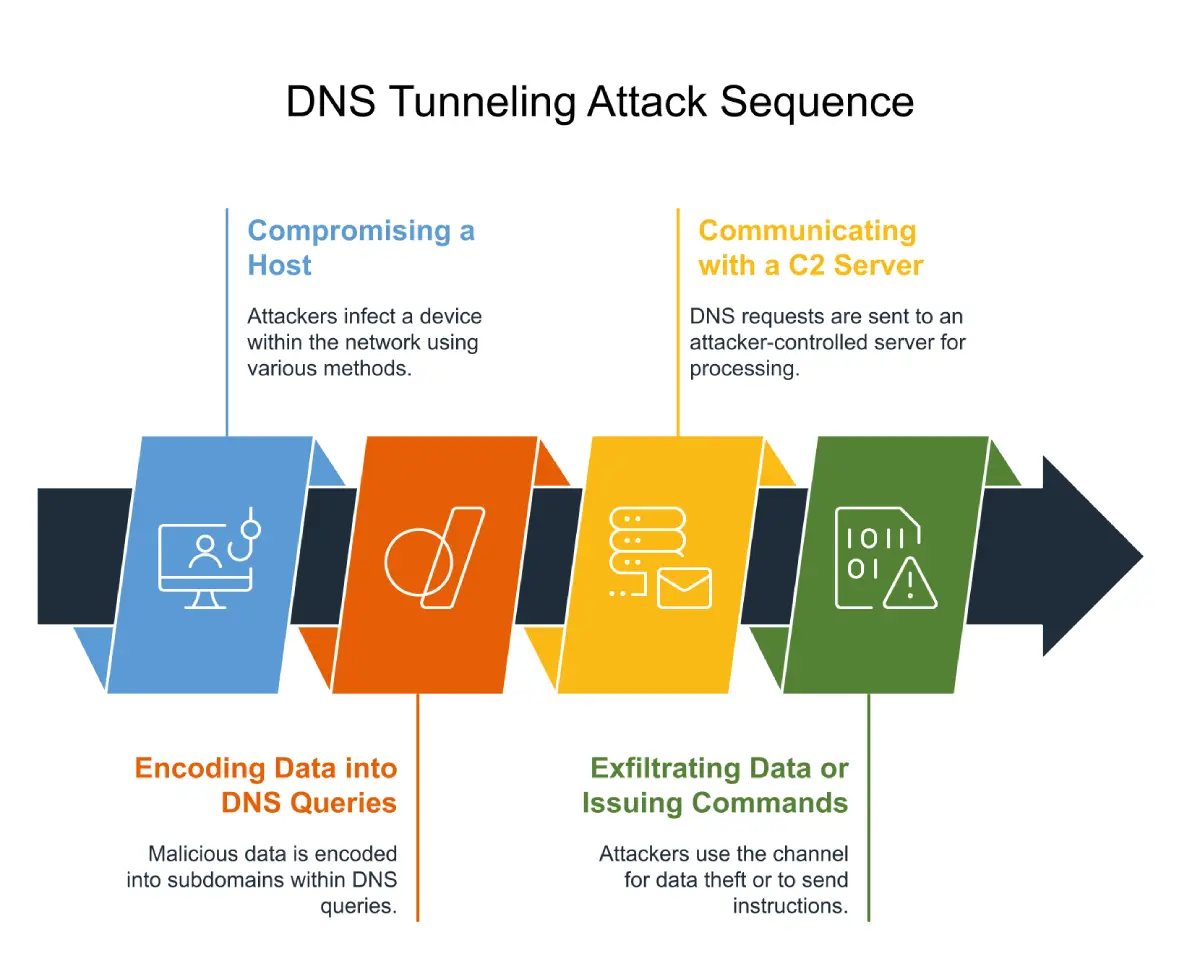
DNS turns domain names into IP addresses, and many network services depend on it. Attackers know that. They abuse DNS tunneling to build covert channels for data exfiltration and command-and-control (C2), hiding malicious traffic inside what looks like ordinary DNS queries. Many firewalls let DNS through with little inspection, which is part of why the technique works. This guide covers common DNS tunneling detection methods, how to read a DNS tunneling PCAP, and how to prevent, block, and mitigate tunnels.
What is a DNS Tunneling Attack?
In a DNS tunneling attack, the attacker packs data into DNS queries and responses so a compromised machine can talk to a server the attacker controls. Because DNS traffic often passes through firewalls uninspected, the channel stays hidden from most security controls.
Tunnels run both ways. Outbound queries can carry stolen data, and the responses can bring commands, payloads, or extra tools back in, so watch inbound DNS responses too, not just outbound queries. MITRE ATT&CK tracks this behavior as T1071.004 (Application Layer Protocol: DNS)[1]. Its procedure examples include OilRig’s BONDUPDATER malware, which uses TXT records in a DNS tunneling protocol, Cobalt Group, which has used DNS tunneling for C2, and Ember Bear, which has used tools such as dnscat2 and Iodine. Open-source tools such as iodine and dnscat2 are common examples, and MITRE’s DNS tunneling detection analytics reference both.
How DNS Tunneling Works
DNS Tunneling Detection Techniques
What Are the Common Methods to Detect DNS Tunneling?
Teams usually combine several methods, since no single indicator confirms tunneling on its own:
- Payload analysis: query length, entropy, encoding, and record types
- Traffic analysis: query volume, unique subdomains, NXDOMAIN rates, and response sizes
- Behavioral and anomaly detection against DNS baselines
- Threat intelligence and domain reputation matching
- PCAP review to confirm and investigate suspected tunnels
-
What data has been potentially exposed? -
Incursion detection and Persistence detection -
How should I respond?
Detection matters because tunneled traffic often passes through controls that never inspect DNS. Greg Farnham’s Detecting DNS Tunneling (GIAC GCIA Gold Certification paper, 2013) describes two main approaches: payload analysis, which looks at individual DNS requests, and traffic analysis, which looks at communication patterns over time. The paper is more than a decade old, but later surveys still use the same split, and the sections below add current guidance. Both approaches work better alongside behavioral analytics, threat intelligence, and endpoint context.
Combinations matter more than any single signal. Many long, high-entropy, unique subdomains under one domain, sustained over time, make a stronger pattern than any one anomaly. Signals such as TTL, record type, NXDOMAIN rate, and destination geography are useful context, but they also appear in legitimate traffic.
1. Payload Analysis: Examining DNS Query Structures
Payload analysis means inspecting individual DNS requests for anything that looks off.
Key Indicators:
-
Query Length: Tunneling often produces unusually long domain names and subdomain labels. DNS caps labels at 63 characters and full names at 253 in text form (RFC 1035[2]), but attackers get around that by spreading encoded data across several labels. -
Character Composition & Entropy: Tunneling queries tend to look random. They show high entropy, with no recognizable words and nothing a person would type. -
Uncommon Record Types: Attackers may abuse TXT, NULL, and CNAME records. TXT records can carry encoded text, and CNAME records can form part of a tunnel through encoded names and responses. Tunnels also work over ordinary A and AAAA records, and legitimate software uses TXT and CNAME records too, so no record type is a tunneling signal on its own.
Detection Method:
-
Flag and investigate DNS queries above a length threshold, such as 52 characters, and tune it to your environment. -
Watch for unusual volumes of TXT, NULL, or CNAME responses, and treat them as a reason to look closer, not a verdict. -
Apply entropy-based detection to find encoded payloads in subdomains. -
Use regular expressions to catch Base32, Base64, or hex-encoded patterns inside domain names. -
These thresholds are starting points. CDNs, cloud services, and security tools also produce long, random-looking names, so tune them to your environment.
2. Traffic Analysis: Identifying Suspicious DNS Query Patterns
Traffic analysis looks at DNS activity as a whole, because tunneling leaves patterns that no single query shows.
Key Indicators:
-
High Query Volume: Tunnels move data in lots of small queries, so a sudden jump in DNS volume can point to one. Low-and-slow tunnels may not spike at all, and MITRE notes that DNS beacons can be hard to detect because they communicate infrequently. -
Frequent Queries to a Single Domain: Attackers register and control the domains they tunnel through. Heavy request rates to one domain deserve a look. A newly registered domain adds context, but domain age alone isn’t a strong signal. -
NXDOMAIN Response Volume: Tunneling tools often trigger failed lookups by querying subdomains that don’t exist. A lot of NXDOMAIN responses can be a supporting signal, though typos and misconfigurations cause failed lookups too. -
Unusual Geographic Destinations: Queries to name servers in regions where you have no business presence can add weight to other signals, but not on their own. DNS and CDN infrastructure is often spread around the world. -
Large or Asymmetric Responses: Large responses, or a high ratio of response bytes to query bytes, can mean data is coming in, particularly alongside other indicators.
Detection Method:
-
Watch query frequency per source IP. Sudden spikes are worth a look. -
Count the unique subdomains under each domain. Tunnels tend to generate a new subdomain for nearly every request. -
Track NXDOMAIN responses and flag hosts with lots of failed lookups. -
Treat unusually short TTL (Time to Live) values as supporting context only. Attacker infrastructure uses short TTLs, and so do legitimate DNS services, so weigh them alongside domain age, reputation, and query behavior. -
Compare response size to query size per domain.
3. Encrypted DNS Considerations (DoH, DoT, and DoQ)
Watching port 53 won’t show you tunnels that run over encrypted DNS, and each protocol behaves differently. The ports below are defaults, and clients and servers can agree to use others, so port-based controls alone aren’t airtight.
-
DoH[3] usually runs over HTTPS on TCP port 443 and can also use HTTP/3 over QUIC. That lets it blend in with ordinary web traffic, so port-based monitoring alone can’t tell them apart. You can look at known DoH resolver destinations, connection metadata, traffic patterns, and endpoint or browser telemetry. Wherever you can, enforce approved enterprise resolvers and compare network activity with resolver logs. MITRE’s T1071.004 page lists BRICKSTORM as having used DoH to resolve C2 infrastructure and obscure DNS traffic from inspection, and Brute Ratel C4 as able to use DoH for C2. -
DoT[4] usually uses TCP port 853, which makes unapproved connections easy to spot and restrict. -
DoQ[5] runs over QUIC, typically on UDP port 853. RFC 9250 also allows another port by agreement, including 443. Treat it the way you treat DoT.
Without decryption or resolver logs, network monitoring sees only connection metadata, such as destinations, timing, volume, and TLS handshake details. It can’t see query names or record types inside the encrypted session. When visibility is limited, resolver logs from resolvers you control, endpoint telemetry, and policies that control which resolvers endpoints can use help fill the gap.
4. Behavioral and Anomaly Detection
Fixed thresholds are easy for attackers to tune around, so behavioral detection adds the context thresholds lack. MITRE ATT&CK’s DNS tunneling detection strategy (DET0400[6]), updated in May 2026, covers high-frequency queries from unusual processes, long or frequent subdomains, encoded query patterns, and lookups tied to known malicious infrastructure. It spans Windows, Linux, macOS, network devices, and ESXi hosts.
That analysis depends on what you can see. With visible DNS, models can work from query names, timing, volume, and destinations. With encrypted DNS and no resolver logs, they have only connection metadata, such as flow size, timing, and direction, and can’t inspect the queries themselves. Machine learning is an active research area for both cases, including DoH tunnel detection from flow features, but accuracy depends on training data, features, and baselines. It works best next to rule-based and threat intelligence detection.
Detection Method:
-
Baseline normal DNS per host, segment, or asset role, and alert on deviations. -
Combine entropy, query volume, timing, and the ratio of unique subdomains to total queries instead of leaning on one signal. -
If you have endpoint telemetry, check which process made the queries.
Fidelis NDR takes this approach through Network Behavior Analysis, which learns baselines for long subdomain names and unique subdomain counts per domain.
5. DNS Tunneling PCAP Analysis
A DNS tunneling PCAP is often the quickest way to confirm a suspicion. None of the filters below is a detection rule. Each one narrows a capture so you can review it, so correlate what you find.
Detection Method:
-
Find long query names with dns.qry.name.len > 52 && dns.flags.response == 0. The second condition limits results to queries, since responses repeat the query name. -
Review TXT (dns.qry.type 16) and NULL (dns.qry.type 10) traffic, but don’t rely on record type alone. Tunnels also use A, AAAA, and CNAME records, and TXT has legitimate uses. -
Review failed lookups with dns.flags.rcode == 3 (NXDOMAIN). This applies to responses, so match each one back to the client’s query. -
Pull fields out at scale with tshark -r capture.pcap -Y “dns.qry.name.len > 52 && dns.flags.response == 0” -T fields -e frame.time -e ip.src -e dns.qry.name. Use ipv6.src for IPv6 traffic. -
Count unique subdomains per parent domain, sort by source IP, and look for evenly spaced queries. -
Check domain age and reputation, and rule out CDNs, cloud load balancers, update services, and security appliances, which legitimately generate long names. -
Record confirmed domains, resolvers, and hosts as indicators for blocklists and threat intelligence.
One caveat: a PCAP of encrypted DNS (DoH, DoT, or DoQ) won’t show query names unless you can decrypt the traffic or get matching resolver logs. Field names can also differ slightly between Wireshark versions, so test the filters on yours.
How to Mitigate DNS Tunneling Attacks?
Detection matters, but DNS tunneling prevention and mitigation take more than detection. These are the strategies that work best, including ways to block DNS tunneling at the resolver and at network egress:
1. Implement DNS Filtering & Threat Intelligence
DNS filtering blocks malicious requests before they reach their destination, and pairing it with live threat intelligence lets you block known bad domains early. It’s a good first layer, but it can’t catch infrastructure nobody has listed yet.
Actionable Steps:
-
Deploy real-time threat intelligence feeds to track suspicious domains. -
Block or risk-score newly registered domains (NRDs). Use them as one signal alongside reputation and query behavior, not a standalone indicator, since new domains aren’t always malicious. -
Block domains categorized as DNS tunneling or known malicious at the resolver using protective DNS. -
Restrict DNS queries to external resolvers to prevent bypassing security policies.
2. Monitor & Analyze DNS Traffic Patterns
Tunneling depends on high query volumes and odd request patterns, so continuous monitoring will show deviations from normal behavior. This is how you catch the tunnels blocklists miss, though it only works if you log enough DNS and have a baseline to compare against.
Actionable Steps:
-
Establish baselines for normal DNS traffic to detect anomalies. -
Monitor query volume per domain. High volumes to a single domain may indicate tunneling. -
Apply behavioral analytics and machine learning to spot unusual DNS query sequences, subdomain patterns, and traffic characteristics. For encrypted DNS, that means connection metadata unless you have resolver logs.
3. Implement DNSSEC Validation
DNSSEC helps authenticate DNS responses and protects against DNS spoofing and cache poisoning. It does not prevent or detect DNS tunneling, and it does not encrypt DNS traffic. RFC 4033[7] describes it as providing origin authentication and integrity protection, not confidentiality. Treat DNSSEC validation as one part of your DNS security strategy, next to traffic monitoring, resolver restrictions, and behavioral detection.
Actionable Steps:
-
Implement DNSSEC validation on recursive resolvers to catch forged or tampered responses. -
Sign your own zones so other resolvers can validate your records. -
Regularly audit DNS configurations to detect unauthorized changes.
4. Apply Query Rate Limiting & Anomaly Detection
Attackers need lots of queries to move data through a tunnel, so rate limiting can slow them down. It works best where baselines are stable, like servers that should barely touch DNS. It slows a tunnel but won’t detect or stop one by itself.
Actionable Steps:
-
Set query-frequency thresholds from your baselines. Test them first and consider alerting before you enforce, because aggressive limits can break legitimate applications and DNS-dependent services. -
Limit allowed record types, such as NULL, where there’s no business need. Record type alone isn’t a reliable control, so pair it with behavioral detection. -
Review unusually short TTL values alongside domain age and reputation, since legitimate services use them too.
5. Restrict Direct External DNS Resolutions
Many tunneling tools skip internal security by sending queries straight to external resolvers. Blocking that forces everything through resolvers you monitor, and it removes the easiest bypass these tools have.
Actionable Steps:
-
Configure firewall rules to block direct outbound DNS queries to public resolvers. -
Require all DNS queries to pass through internal resolvers for logging and monitoring. -
Implement split-horizon DNS to separate internal and external query handling. -
Allow outbound DNS only from approved resolvers and block direct port 53 traffic from other hosts. -
Control encrypted DNS: restrict DoT (TCP 853) and DoQ (UDP 853) to approved resolvers, keeping in mind that these are default ports, set browser and OS policies to use the enterprise resolver, and block or alert on known public DoH endpoints. That only covers resolvers you know about, so enforce approved resolvers at the endpoint as well. -
Investigate hosts that keep trying to reach unapproved resolvers, including the process behind the attempts.
6. Educate Employees & Conduct Regular Security Audits
Many successful DNS tunneling attacks start with phishing or a compromised endpoint, so awareness and audits cut risk at the entry point. They cover how tunneling malware gets in and whether DNS settings have drifted, but they don’t replace technical controls.
Actionable Steps:
-
Conduct regular security training on identifying DNS-related threats. -
Perform routine DNS audits to detect unauthorized changes or misconfigurations.
7. Validate DNS Tunneling Defenses Through Penetration Testing
Controls only count if they work. Authorized penetration testing with advanced tunneling and data exfiltration techniques shows whether your detection and blocking hold up before a real attacker tests them for you. Run it only against systems you own or have written permission to test.
What to Validate:
-
Whether tunneling attempts trigger alerts, and how fast. -
Whether low-and-slow tunneling, with a low query rate and shorter labels, gets past your detection. -
Whether test hosts can reach unauthorized resolvers or encrypted DNS endpoints. -
Whether your incident response process finds the source endpoint and contains it. -
Use test domains and resolvers you control, and send synthetic data, never real customer or employee data. -
Decide in advance whether the SOC knows about the test, and record what each control caught or missed. -
Get written approval first, save a PCAP of each test for tuning, and retest after fixes.
Stopping DNS tunneling takes more than one control. Combine real-time threat intelligence, continuous DNS monitoring, resolver and egress controls, and behavioral detection so you can detect, block, and prevent covert tunneling. DNSSEC belongs in the baseline, but it is not a tunneling control.
How Fidelis Network Detection and Response (NDR) Enhances DNS Security
Fidelis Network® is a network detection and response (NDR) solution built to catch advanced threats, DNS tunneling included. It offers deep network visibility and automated threat detection, plus response capabilities. Payload and traffic inspection are complemented by Network Behavior Analysis, which learns what normal DNS looks like and flags deviations.
1. Deep DNS Traffic Inspection
-
Deep Session Inspection® (DSI) reassembles full sessions and records rich metadata, which helps security teams investigate anomalous DNS queries and responses. -
Detects high-entropy DNS payloads, unusually long subdomains, and suspicious DNS request patterns linked to tunneling. -
Provides real-time analytics to flag unauthorized data exfiltration attempts. -
For encrypted DNS (DoH, DoT, and DoQ), visibility without decryption comes from session metadata, not from the contents of the queries.
2. Integrated Threat Intelligence
-
Fidelis Network® uses real-time threat intelligence feeds to correlate DNS queries with known malicious indicators. -
It also integrates with STIX/TAXII feeds, Suricata rules, and proprietary Fidelis Insight® intelligence. -
Helps surface emerging DNS-based attack techniques earlier.
3. Detecting Lateral Movement & Data Exfiltration
-
Monitors east-west traffic within internal networks to detect attackers leveraging DNS tunnels for covert data transfers. -
Flags repetitive DNS requests to untrusted domains, an indicator of potential C2 communication or staged data exfiltration. -
Uses behavioral analytics to identify deviations from normal DNS usage patterns. Fidelis Network® Behavior Analysis compares DNS behavior against established baselines and flags unusually long subdomain names, a high number of unique subdomains for a domain, rare domain usage, and DNS activity that’s abnormal for an asset. Any of these can mean DNS is being used as a covert channel for command-and-control or data movement.
Fidelis Network® goes beyond traditional detection by automating threat analysis, correlating alerts, and supporting rapid incident response. Teams using it get:
- Comprehensive network visibility: analysis of network activity across ports and protocols, including useful metadata from encrypted connections.
- Automated threat correlation: fewer false positives and faster decision-making.
- Proactive threat hunting: a way for security teams to detect threats before they cause harm.
-
Comprehensive Threat Detection & Analysis -
Data Loss Prevention (DLP) & Email Security -
Deep Session Inspection & TLS Profiling

Conclusion
DNS tunneling is still an effective way for attackers to steal data and keep a covert line open. But payload analysis, traffic analysis, behavioral detection, PCAP review, and NDR such as Fidelis Network® give you a real chance to detect, block, and mitigate it.
Frequently Asked Questions
Does using encrypted DNS (DoH, DoT, or DoQ) prevent DNS tunneling?
No. Encrypted DNS protocols such as DoH, DoT, and DoQ protect privacy, but they don’t stop tunneling, and attackers can use those same channels. Without decryption or resolver logs, network monitoring sees only connection metadata, so behavioral analysis of that metadata and control over which resolvers endpoints can use matter more.
What industries are most targeted by DNS tunneling?
Finance, healthcare, and government are frequently targeted because they hold sensitive data and face persistent threats.
Can DNS tunneling be used for legitimate purposes?
Yes. Some organizations use DNS tunneling for secure remote access or to get around network restrictions. Because attackers abuse it too, unrestricted DNS traffic is a real security risk.
What are the common methods to detect DNS tunneling?
The main ones are payload analysis, traffic analysis, behavioral detection, and threat intelligence matching. Most teams use several, since no single indicator confirms tunneling. The detection techniques section above goes into each one.
How do you block DNS tunneling?
Route all DNS through approved, monitored resolvers, block direct outbound DNS and unapproved encrypted DNS, and filter known malicious domains with protective DNS. Behavioral detection covers what blocklists miss.
How do you analyze a DNS tunneling PCAP?
Filter for long query names, uncommon record types, and NXDOMAIN responses. Then confirm with unique subdomain counts, timing, and domain reputation. No single filter proves tunneling, and encrypted DNS won’t show query names unless you decrypt it.
The post Detecting and Controlling Hidden DNS Tunnel Attacks appeared first on Fidelis Security.
