

TL;DR
MCP servers connect LLMs to external tools and data sources through a standardized protocol. Public MCP servers provide capabilities such as web search, GitHub access, database queries, and browser automation through structured tool definitions.
These servers typically run as long-lived stdio processes that respond to tool invocation requests. To use them reliably in applications or share them across teams, they need to be deployed as stable, accessible endpoints.
Clarifai allows MCP servers to be deployed as managed endpoints. The platform runs the configured MCP process, handles lifecycle management, discovers available tools, and exposes them through its API.
This tutorial walks you through how to deploy any public MCP server. We’d be using the DuckDuckGo browser server as a reference implementation. The same approach applies to other stdio-based MCP servers, including GitHub, Slack, and filesystem integrations.
DuckDuckGo Browser MCP Server
The DuckDuckGo browser MCP server is an open-source MCP implementation that exposes web search capabilities as callable tools. It allows language models to perform search queries and retrieve structured results through the MCP protocol.
The server runs as a stdio-based process and provides tools such as ddg_search for executing web searches. When invoked, the tool returns structured search results that LLMs can use to answer questions or complete tasks that require current web information.
We use this server as the reference implementation because it does not require additional secrets or external configuration. The only requirement is defining the MCP command in config.yaml, which makes it straightforward for us to deploy and test on Clarifai.
If you’d like to build a custom MCP server from scratch with your own tools and logic, this guide walks through that process using FastMCP.
Now that we have defined the reference server, let’s start.
Set Up the Environment
Install the Clarifai Python SDK:
Set your Clarifai Personal Access Token as an environment variable. Retrieve your PAT from the security settings in your Clarifai account.
Clone the runners-examples repository and navigate to the browser MCP server directory:
The directory contains the deployment files:
- config.yaml: Deployment configuration and MCP server specification
- 1/model.py: Model class implementation
- requirements.txt: Python dependencies
Configure the Deployment
Before uploading, update config.yaml with your Clarifai model identifiers and compute settings. This file defines the model metadata, MCP server startup command, and resource requirements. Clarifai uses it to start the MCP server, allocate compute, and expose the server’s tools through the model endpoint.
The mcp_server section defines how the MCP server process is started. command specifies the executable, and args lists the arguments passed to that executable. In this example, uvx duckduckgo-mcp-server starts the DuckDuckGo MCP server as a stdio-based process.
The model implementation in 1/model.py inherits from StdioMCPModelClass:
StdioMCPModelClass starts the process defined in config.yaml, discovers the available tools through the MCP protocol, and exposes those tools through the deployed model endpoint. No additional implementation is required beyond inheriting from StdioMCPModelClass.
The DuckDuckGo MCP server runs on CPU and requires minimal resources.
Upload & Deploy MCP Server
Upload the MCP server using the Clarifai CLI:
The –skip_dockerfile flag is required when uploading MCP servers. This command packages the model directory and uploads it to your Clarifai account.
After uploading your MCP server, deploy it on compute so it can run and serve tool requests.
Go to the Compute section and create a new cluster. You will see a list of available instances across different providers and regions, along with their hardware specifications.
Each instance shows:
- Provider
- Region
- Instance type
- GPU and GPU memory
- CPU and system memory
- Hourly price
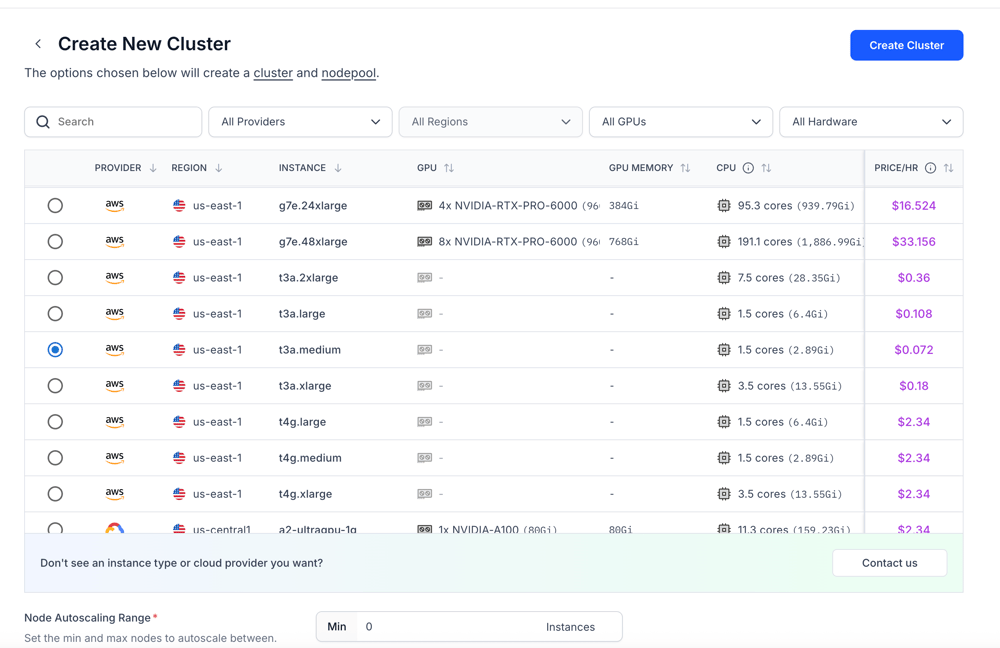
Select an instance based on the resource requirements you defined in your config.yaml file. For example, if you specified certain CPU and memory limits, choose an instance that satisfies or exceeds those values. Most MCP servers run as lightweight stdio processes, so GPU is typically not required unless your server explicitly depends on it.
After selecting the instance, configure the node pool. You can set autoscaling parameters such as minimum and maximum replicas based on your expected workload.
Finally, create the cluster and node pool, then deploy your MCP server to the selected compute. Clarifai will start the server using the command defined in your config.yaml and expose its tools through the deployed model endpoint.
You can follow the guide to learn how to create your dedicated compute environment and deploy your MCP server to the platform.
Using the Deployed MCP Server
Once deployed, we can interact with the MCP server using the FastMCP client. The client connects to the Clarifai endpoint and discovers the available tools.
Replace the URL with your deployed MCP server endpoint.
This client establishes an HTTP connection to the deployed MCP endpoint and retrieves the tool definitions exposed by the DuckDuckGo server. The list_tools() call confirms that the server is running and that its tools are available for invocation.
Integrate with LLMs
The tools exposed by your deployed MCP server can be used with any LLM that supports function calling. Configure your MCP client and OpenAI-compatible client to connect to your Clarifai MCP endpoint so the model can discover and invoke the available tools.
Your MCP server is now deployed as an API endpoint on Clarifai, and its tools can be accessed and invoked from any compatible LLM through the MCP client.
Frequently Asked Questions (FAQs)
-
Can I deploy any MCP server using this method?
Yes. As long as the MCP server runs as a stdio-based process, it can be defined in the mcp_server section of config.yaml. Update the command and arguments, upload the model, and the server will be exposed through its own endpoint.
-
Do MCP servers require Docker to deploy?
No. When uploading MCP servers using the Clarifai CLI, the –skip_dockerfile flag allows the deployment without requiring a custom Dockerfile.
-
Can I use deployed MCP servers with any LLM?
Yes. Any LLM that supports function calling or tool calling can use the tools exposed by a deployed MCP server. The tools must be formatted according to the model’s function calling schema.
-
Do MCP servers require API keys?
It depends on the server implementation. Some public MCP servers, such as the DuckDuckGo example used in this guide, do not require additional secrets. Others may require API credentials defined in environment variables or configuration.
Closing Thoughts
We converted a stdio based MCP server into a publicly accessible API endpoint on Clarifai. Its tools can now be discovered and invoked by any LLM that supports function calling.
This approach lets you move MCP servers from local development into stable, shareable infrastructure without changing their core implementation. If a server runs over stdio, it can be packaged, deployed, and exposed through Clarifai.
You can now deploy your own MCP servers, connect them to your models, and extend your LLM applications with custom tools or external integrations. For more examples, explore the runners-examples repository.
