


Asus Zenbook S16
MSRP $1,899.99

“A stunning OLED display and lightweight build make a strong case, but the performance ceiling is hard to ignore once you push it.”
Pros
- Thin and light
- Brilliant display
- Battery life
Cons
- Heats up during heavy workloads
- Slim port selection
- Costs a pretty penny
Quick Take
The Zenbook S16 is one of those laptops that gets a lot right, but very deliberately stops short of going all-in. Its biggest strength is how effortlessly it combines a large 16-inch OLED display with a genuinely lightweight and portable chassis. At around 1.5 kg, it simply does not behave like most laptops in this category, and that alone makes it stand out.
Day-to-day performance is excellent. The Ryzen AI 9 465 handles multitasking, browsing, and light creative work without breaking a sweat, and the overall experience feels fast and reliable. The display is another highlight, offering vibrant colors, deep contrast, and a smooth 120Hz refresh rate that makes everything feel fluid.
However, the laptop is clearly tuned with restraint. Sustained performance is limited, and the integrated graphics, while capable, are not meant for anything demanding. Battery life is solid enough for a full workday, but not class-leading, and the glossy display can struggle in very bright environments.
In short, this is a well-balanced ultrabook that prioritises portability, design, and everyday usability over raw power. It does exactly what it sets out to do, just without trying to be more than that.
Asus Zenbook S16 Specifications
| Model Name | Asus Zenbook S16 (UM5606G) |
| Operating System | Windows 11 Home |
| Processor | AMD Ryzen AI 9 465 (10 cores, 20 threads, up to 5GHz, 34MB cache) |
| NPU | AMD XDNA NPU (up to 50 TOPS) |
| Graphics | AMD Radeon Graphics (RDNA 3.5) |
| Memory | 32GB LPDDR5X (8533MHz, onboard) |
| Storage | 1TB PCIe 4.0 x4 NVMe M.2 SSD |
| Display | 16-inch OLED, 3K (2880 × 1800), 16:10 120Hz refresh rate, 0.2ms response time 400 nits SDR, 1100 nits HDR peak brightness 100% DCI-P3, 1,000,000:1 contrast ratio VESA DisplayHDR True Black 1000 Glossy, touch (stylus supported), PANTONE Validated TÜV Rheinland-certified, SGS Eye Care Display |
| Screen-to-Body Ratio | 90% |
| Build Material | Ceraluminum (ceramic-aluminium composite) |
| Color Options | Antrim Gray, Scandinavian White |
| Camera | FHD IR camera with 3DNR, ambient light & color sensor |
| Wireless Connectivity | Wi-Fi 7 (802.11be, tri-band) |
| Bluetooth 5.4 | |
| Ports | 1x USB 3.2 Gen 2 Type-A 2x USB 4.0 Gen 3 Type-C (Display + Power Delivery) 1x HDMI 2.1 TMDS 1x 3.5mm combo audio jack 1x SD 4.0 card reader |
| Audio | 6-speaker system with Dolby Atmos |
| 3 microphones with AI noise cancellation | |
| Touchpad | ASUS ErgoSense touchpad with smart gestures |
| Battery | 83Wh lithium-polymer |
| Charging | 68W USB-C power adapter |
| Dimensions (W x D x H) | 35.36 × 24.30 × 1.19 – 1.29 cm |
| Weight | 1.50 kg |
Asus Zenbook S16 is here, and we are putting it straight to the test
Sixteen-inch laptops usually come with a bit of baggage. Not just metaphorically, but literally. They are big, often heavy, and rarely something you want to carry around all day. The Asus Zenbook S16 OLED does not follow that script. At around 1.5 kilograms and shockingly slim for its size, it feels almost suspiciously light. The kind of light that makes you wonder what corners have been cut to get there.
It has also been a while since Asus pushed a large-screen Zenbook S. For the past few years, the focus has clearly been on smaller, more compact machines. The S16 changes that, but it does not try to become a full-blown powerhouse. Instead, it sticks to the thin-and-light playbook, just stretched over a 16-inch display.
That means it is not going after heavy hitters like the MacBook Pro 16 or the Dell XPS 16. Those machines are built for sustained performance and serious workloads. The Zenbook S16 sits in a different lane, closer to devices like the MacBook Air M5, Surface Laptop 7 15, and the LG Gram 16. Think large screen, high portability, and performance that is meant to be efficient rather than aggressive.
Under the hood, things get interesting. Asus is using AMD’s new 9-series platform, and our unit comes with the Ryzen AI 9 465 chip, 32 GB of LPDDR5X RAM, and Radeon 880M graphics. On paper, this is about as powerful as integrated graphics get right now, which is a bold claim in a world still dominated by dedicated GPUs.
So naturally, the big question is simple. Can this kind of hardware actually keep up with real-world workloads, or is this another case of great specs on a very thin sheet? That is what we are here to find out.
Asus Zenbook S16 OLED design: The fight for the thinnest 15-inch starts here
If there is one element that defines the Zenbook S16’s design, it is ASUS’s Ceraluminum finish. The material first appeared on the Zenbook A14, but it feels more polished and premium here. The Scandinavian White colour, in particular, stands out. Despite the name, it leans more towards a soft light grey, but the combination with a white keyboard and touchpad gives it a clean, minimal look that feels modern without trying too hard.
The bigger surprise, however, is the weight. At around 1.5 kilograms, this simply does not behave like a typical 16-inch laptop. The first time you pick it up, there is a genuine moment of confusion. It almost feels hollow, as if something is missing inside. That perception fades quickly once you start using it. The chassis is sturdy, with no flex across the lid or keyboard deck, and no creaks when pressure is applied. It feels dense and well-engineered, which is impressive given how slim it is.
ASUS has also added some visual detail that is not just cosmetic. The geometric CNC-machined grille above the keyboard might look like a speaker vent, but it is actually part of the cooling system. Beneath it sits a vapour chamber that helps manage heat. It is a good example of design meeting function, where something that looks premium also serves a clear purpose.
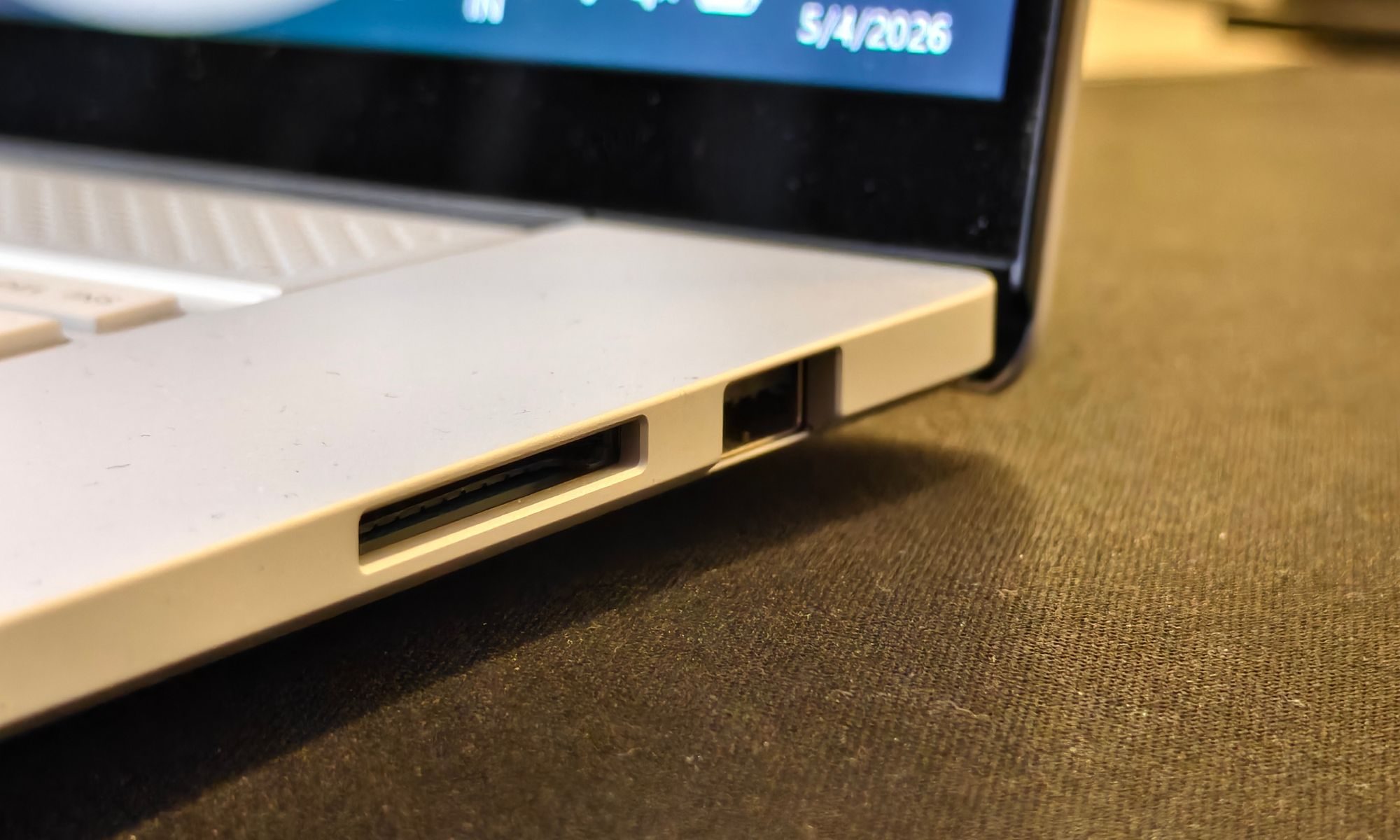
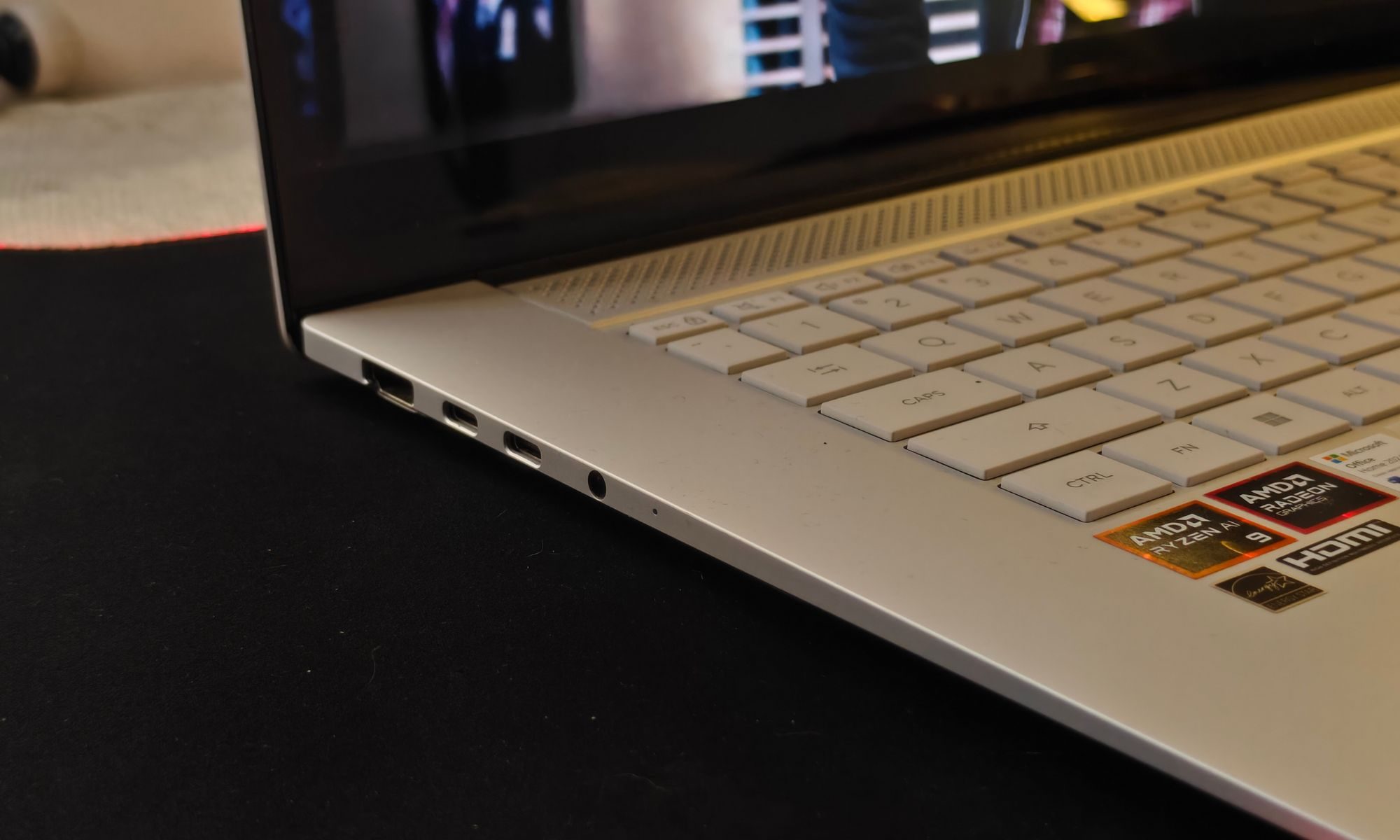
Practicality has not been sacrificed either. ASUS has avoided the trap of stripping away essential ports in the name of minimalism. On the left side, you get two USB-C 4.0 ports, along with an HDMI port and a headphone jack. The right side includes a USB-A port and a full-sized SD card reader. This makes day-to-day usage far less dependent on adapters, which is always a win on a portable machine. The only limitation is that charging is restricted to the left side, which might not suit every desk setup.
There are a few minor ergonomic compromises. The display opens to about 150 degrees instead of lying flat at 180 degrees. This is largely due to the cooling design, as hot air is directed out from the rear edge and beneath the screen instead of upwards. It is a sensible approach thermally, but it does slightly limit flexibility. The front edge of the chassis is also a bit sharper than ideal, and you may notice it pressing against your wrists during extended typing sessions.
The display on the Zenbook S16 is one of those components that instantly impresses, but also quietly reveals its limitations the longer you use it. On paper, it checks almost every box you would want in a premium thin-and-light. You get a sharp 3K resolution, a smooth 120Hz refresh rate, and OLED fundamentals like perfect blacks and excellent contrast. In day-to-day use, that translates into a screen that looks rich, vibrant, and consistently engaging.
The Zenbook S16 looks like it strikes a strong balance between design, build quality, and usability. It manages to deliver a large-screen experience in a chassis that remains genuinely portable, without cutting back on essential features. A 180-degree hinge would have been a welcome addition, but it is not a critical omission. For what it aims to be, this is a well-executed and thoughtfully designed machine.
Asus Zenbook S16 OLED Keyboard, touchpad, and all that: It’s calm and fair here
At first glance, the keyboard on the Zenbook S16 looks very familiar. It follows the same minimalist Zenbook layout, with a lot of space on either side instead of stuffing in up-firing speakers. Clean, symmetrical, and very on-brand for Asus.
Start typing, though, and things change slightly. The key travel here is noticeably shallower than what you get on the 14-inch ZenBooks. That is the trade-off for squeezing everything into such a slim chassis. It is not bad by any means, but it does not quite hit the same sweet spot as some of Asus’s other keyboards or even the 2024 Zephyrus lineup.

If you are used to low-profile keyboards, you will adjust quickly. For emails, documents, and everyday work, this is perfectly fine. But if your day involves long writing sessions or heavy typing, you might find yourself wishing for a bit more depth and feedback. It is one of those cases where good is not quite great.
The backlighting deserves a mention because this is where things could have gone very wrong. White keycaps paired with white LEDs usually result in terrible visibility. Thankfully, that is not the case here. The lighting is bright enough to maintain good contrast in most conditions, and the illumination is fairly even across the keyboard.
There is one small annoyance, though. Once the backlight times out, it does not wake up with a simple swipe on the touchpad as it does on some other ZenBooks. You actually have to press a key. It feels like a minor regression, and hopefully just a quirk on this unit rather than a deliberate change.
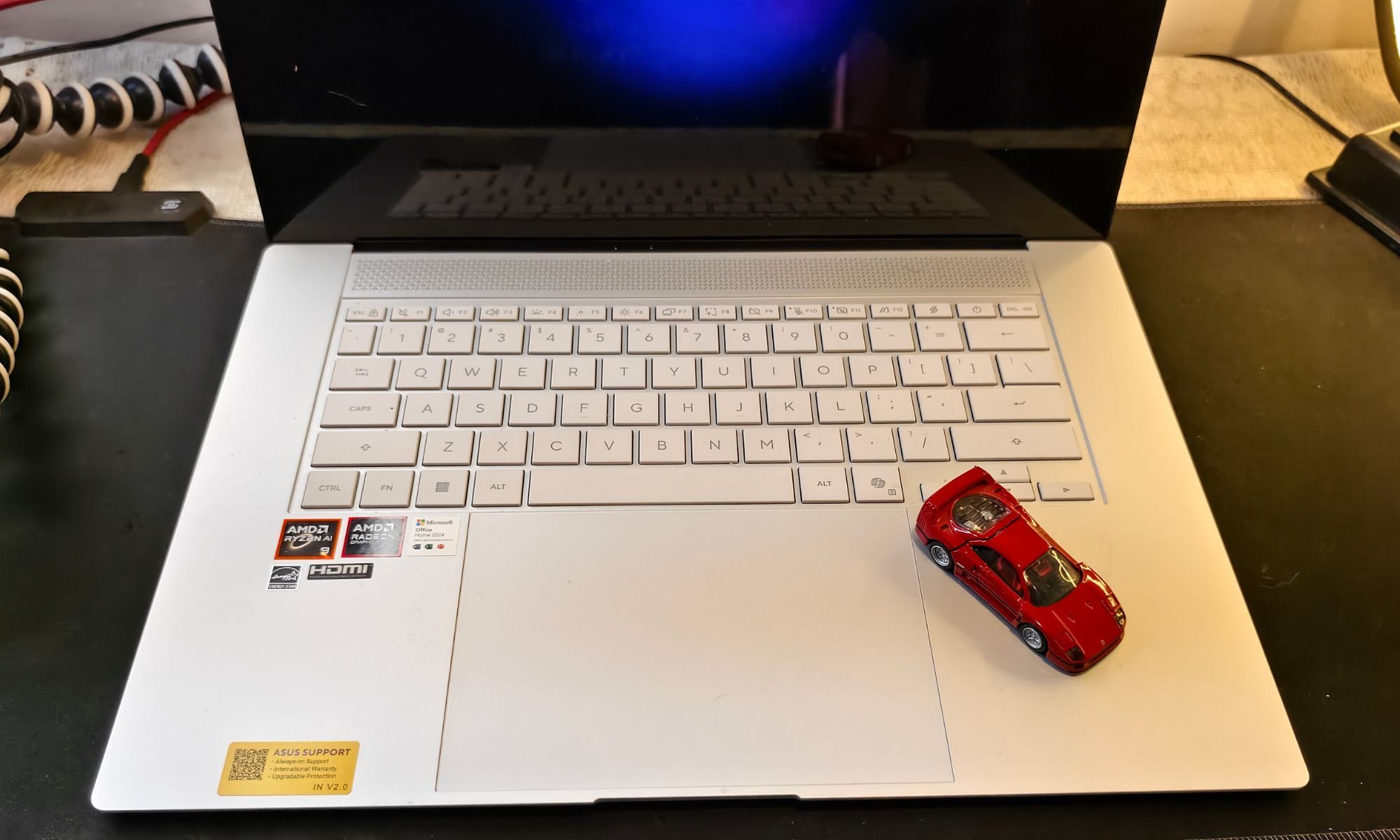
The touchpad, on the other hand, is excellent. It is a large glass surface, smooth, responsive, and very consistent with gestures and taps. It also feels solid, with no rattling even under firmer presses, and the physical clicks are surprisingly refined. This is easily one of the better touchpads you will find in this category.
Asus has also added gesture controls along the edges, letting you adjust brightness and volume by sliding your finger. It works, but it feels a bit unnecessary when the same functions are already mapped to keyboard shortcuts. Nice to have, not something you will actively rely on.
For biometrics, there is no fingerprint sensor this time. Instead, you get an IR webcam with Windows Hello support, which works reliably enough for quick logins.
Design score: 9/10
Asus Zenbook S16 OLED OLED display: Looks the part, but there’s a catch
ASUS is keeping things simple with the Zenbook S16. You only get OLED display options here, no IPS, no matte finishes, no alternatives. It is glossy across the board, whether you pick the touch or non-touch variant. That might sound limiting, but it also means you are getting a consistently high-end visual experience regardless of configuration.
Our unit comes with the 16-inch 3K Lumina OLED panel, featuring a sharp 3K resolution, a smooth 120Hz refresh rate, and OLED fundamentals like perfect blacks and excellent contrast. In day-to-day use, that translates into a screen that looks rich, vibrant, and consistently engaging.
Since it also comes with touch support, to be fair, it works exactly as expected. Although there is a bit of grain visible on solid colors, especially on light backgrounds, when you are browsing or working on documents. It is one of those OLED quirks that comes with the digitizer layer. The good news is that it is much less noticeable than on older OLED touch implementations. If you were not specifically looking for it, you might not even register it during normal use.
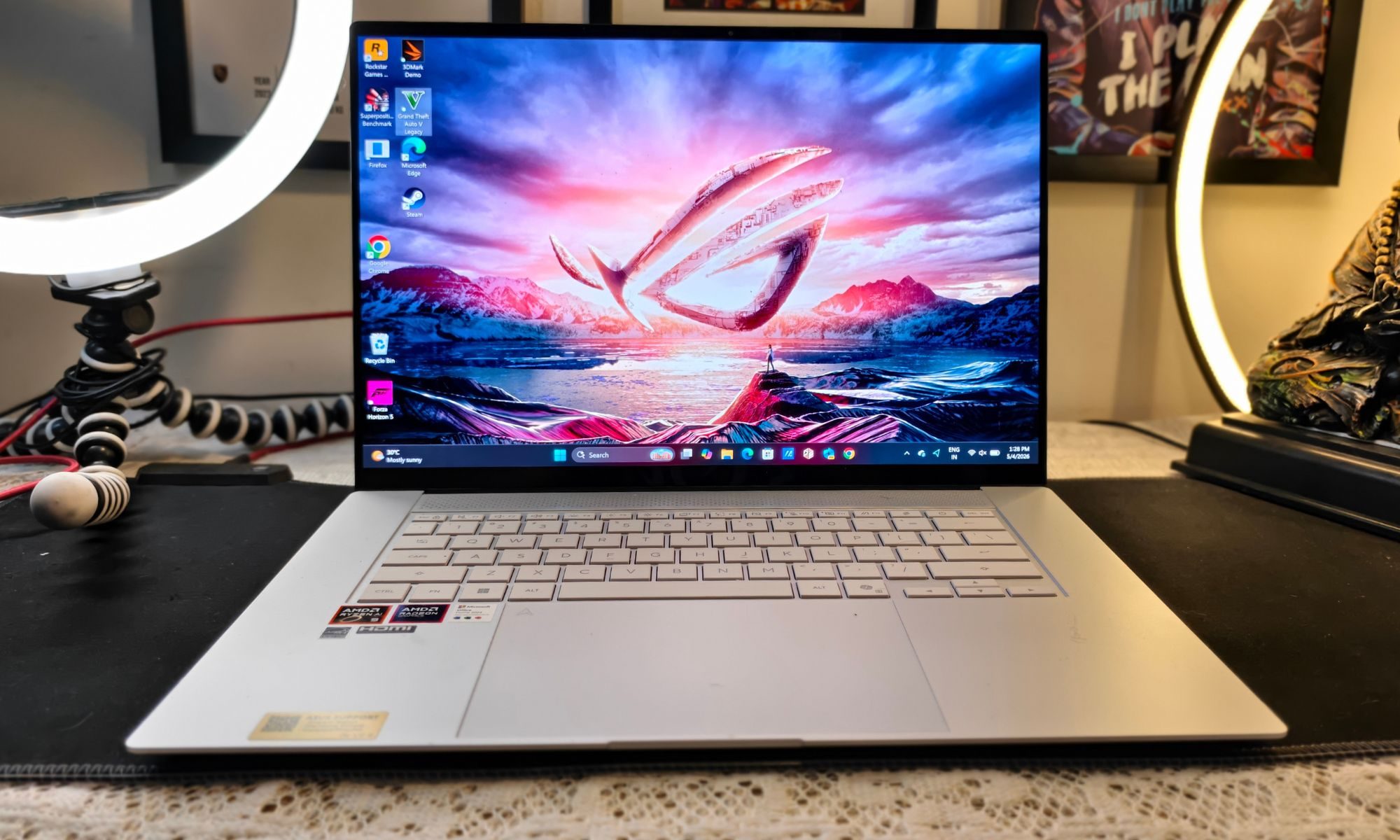
The response is accurate, gestures register cleanly, and there are no obvious issues with tracking. That said, this still feels like one of those features you use a couple of times just because it is there, and then completely forget about. On a traditional clamshell laptop that does not fold or convert, the practicality of a touchscreen is questionable. You might have a specific use case for it, but for most people, it is more of a checkbox feature than something that genuinely adds value.
Beyond that, this is exactly what you expect from a modern OLED panel. It is sharp, colors are vibrant without looking unnatural, and the contrast is essentially perfect thanks to those deep blacks. The panel also covers 100 percent of the DCI-P3 color gamut, which makes it well-suited for content consumption and even light creative work.
Brightness, however, is where things get a bit more grounded. In real-world usage, the panel sits just under 400 nits in SDR, with HDR peaks going up to around 600 nits as per ASUS’s specifications. That sounds decent on paper, but paired with the glossy finish, it does mean visibility can take a hit in very bright environments. Indoors, it is perfectly fine. Outdoors or under harsh lighting, it can feel a bit limiting.

The 120Hz refresh rate and near-instant response times add another layer of usability. Everything feels smooth, whether you are scrolling through webpages or navigating the UI. It also makes casual gaming more enjoyable, especially when combined with the Radeon 880M integrated graphics. While this is not a gaming-first machine, the display certainly does its part to keep things fluid.
Out of the box, the panel is well calibrated, with good color accuracy and uniform brightness across the screen. Being OLED, you also avoid common LCD issues like backlight bleeding or blooming, which is always a plus.
There is, however, the usual OLED consideration of flickering at lower brightness levels.
ASUS offers a workaround through its MyASUS app, where you can enable a flicker-free dimming mode. It is not the most convenient solution since it replaces the standard brightness controls, but it does make a noticeable difference, especially if you are using the laptop in dim environments for extended periods.
Color reproduction is a clear strength here. With full DCI-P3 coverage, the panel feels well-suited for media consumption and even light creative workloads. Watching content on this display is genuinely enjoyable, and the near-instant response times make everything from scrolling to casual gaming feel fluid. It is the kind of screen that makes you want to keep using the laptop just a bit longer.

That said, this is not a flawless implementation. Brightness is where things start to feel a bit constrained. At under 400 nits in typical usage, it is perfectly fine indoors, but struggles once you step into brighter environments. The glossy finish does not help either, as reflections can become distracting under harsh lighting. This is not the display you would want to rely on outdoors or in sunlit workspaces.
The touchscreen layer adds another layer of compromise. While it works well and is responsive, it introduces a slight graininess on lighter backgrounds. It is subtle and easy to ignore, but once you notice it, you cannot completely unsee it. The bigger question, though, is usefulness. On a non-convertible laptop, touch feels more like a feature for the spec sheet than something most users will actively rely on.
Display score: 9/10
Asus Zenbook S16 OLED software and general performance: An overkill for an average day
The Zenbook S16 is powered by the AMD Ryzen AI 9 465 processor, a 10-core, 20-thread chip with boost clocks up to 5GHz. It is paired with 32GB of LPDDR5X-8533 memory and a 1TB PCIe 4.0 NVMe SSD. On the graphics side, you are getting integrated AMD Radeon graphics, built on the RDNA 3.5 architecture.
On paper, this is a very modern, very capable setup for a thin-and-light machine. In practice, it mostly lives up to that promise, but not without a few caveats.
For day-to-day workloads, the Ryzen AI 9 465 feels almost overkill. It handles routine tasks as if it were barely being pushed. Dozens of Chrome tabs, image editing, light video work, and background processes can all run simultaneously without slowing things down. The system remains consistently responsive, and the fast memory definitely helps keep things fluid.

Benchmarks back this up as well. Both single-core and multi-core performance are strong, and more importantly, they translate well into real-world usage. This is not one of those cases where the numbers look impressive, but everyday performance feels average. Here, the responsiveness is tangible.
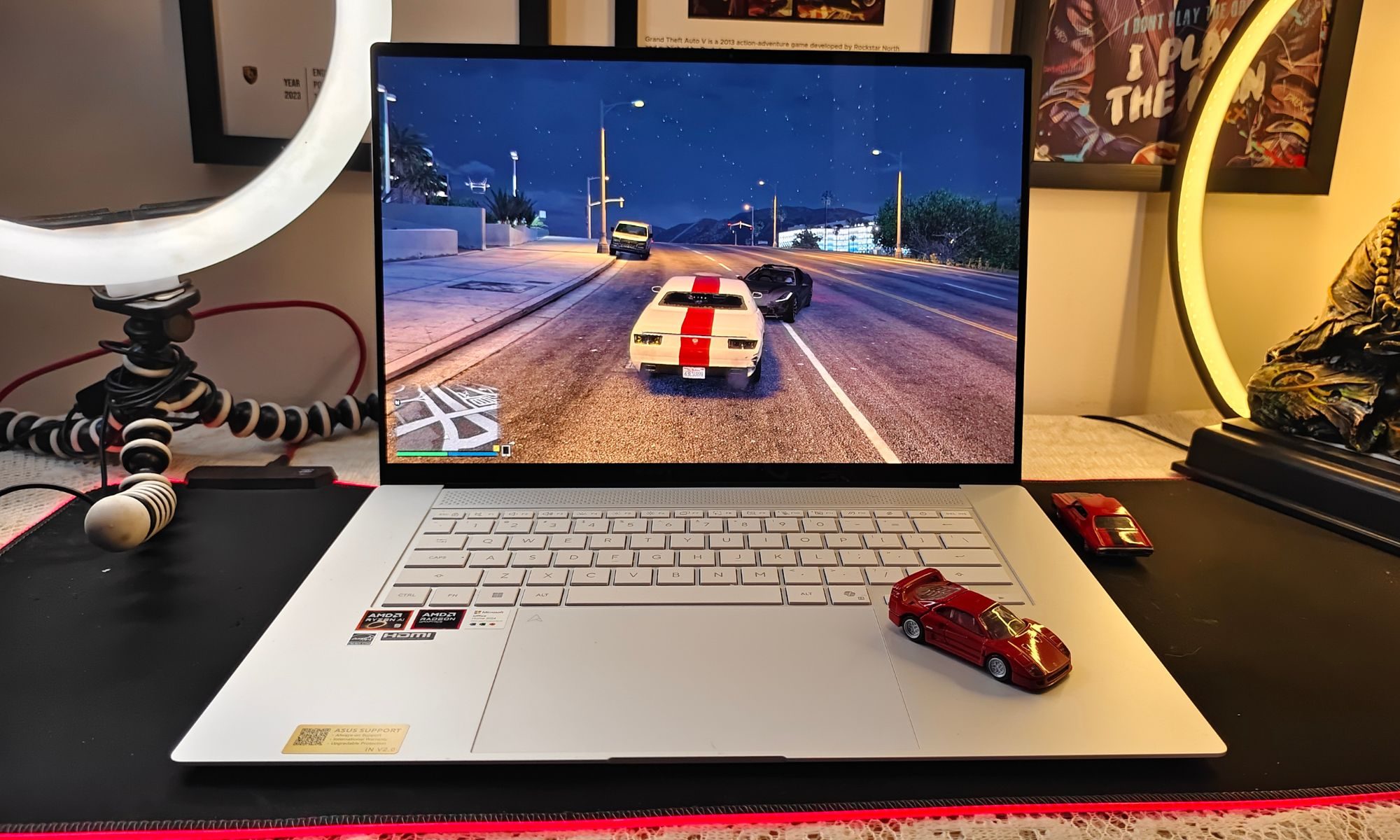
The integrated Radeon graphics also do more than expected. For an iGPU, it is genuinely capable. Esports titles run comfortably at 1080p, and even older AAA titles like GTA V are handled without much trouble. That said, expectations need to stay grounded. This is still integrated graphics, and it shows the moment you push into heavier gaming or GPU-intensive creative workloads.
Where the limitations become clear is under sustained load. The Zenbook S16 is designed around a 28W thermal envelope, and while ASUS’s dual-fan vapor chamber cooling does a commendable job, physics still applies. Performance tends to plateau during longer workloads rather than scaling consistently.
This is not a machine built for extended rendering or heavy-duty processing sessions.
Thermally, the system holds up reasonably well, but it does get warm, especially around the keyboard deck. Fan noise remains controlled for lighter tasks and only becomes noticeable under load. It is not loud, but it is present. For more in-depth, we will be working through this in our benchmarks section.
On the software side, you are dealing with Windows 11, supported by ASUS utilities like MyASUS and ScreenXpert. These offer useful controls for performance profiles, battery health, and display tuning, but they also introduce some overlap with native Windows settings. It works, but it is not the cleanest software experience.
The AI features, powered by the integrated NPU, feel more like future-proofing than something essential right now. Windows Copilot and ASUS AI tools are functional, but they do not fundamentally change how you use the laptop today.
Software score: 8/10
Asus Zenbook S16 OLED benchmarks: The real picture
The Zenbook S16 runs on the AMD Ryzen AI 9 465, a 10-core, 20-thread processor with boost clocks up to 5GHz. It is paired with 32GB of LPDDR5X-8533 memory and a 1TB PCIe 4.0 NVMe SSD, while graphics are handled by integrated AMD Radeon 880M-class hardware. On paper, this is a strong, modern ultrabook configuration built around efficiency and AI capabilities. In practice, however, it is clear that ASUS has tuned this system to prioritise stability and thermals over outright performance.
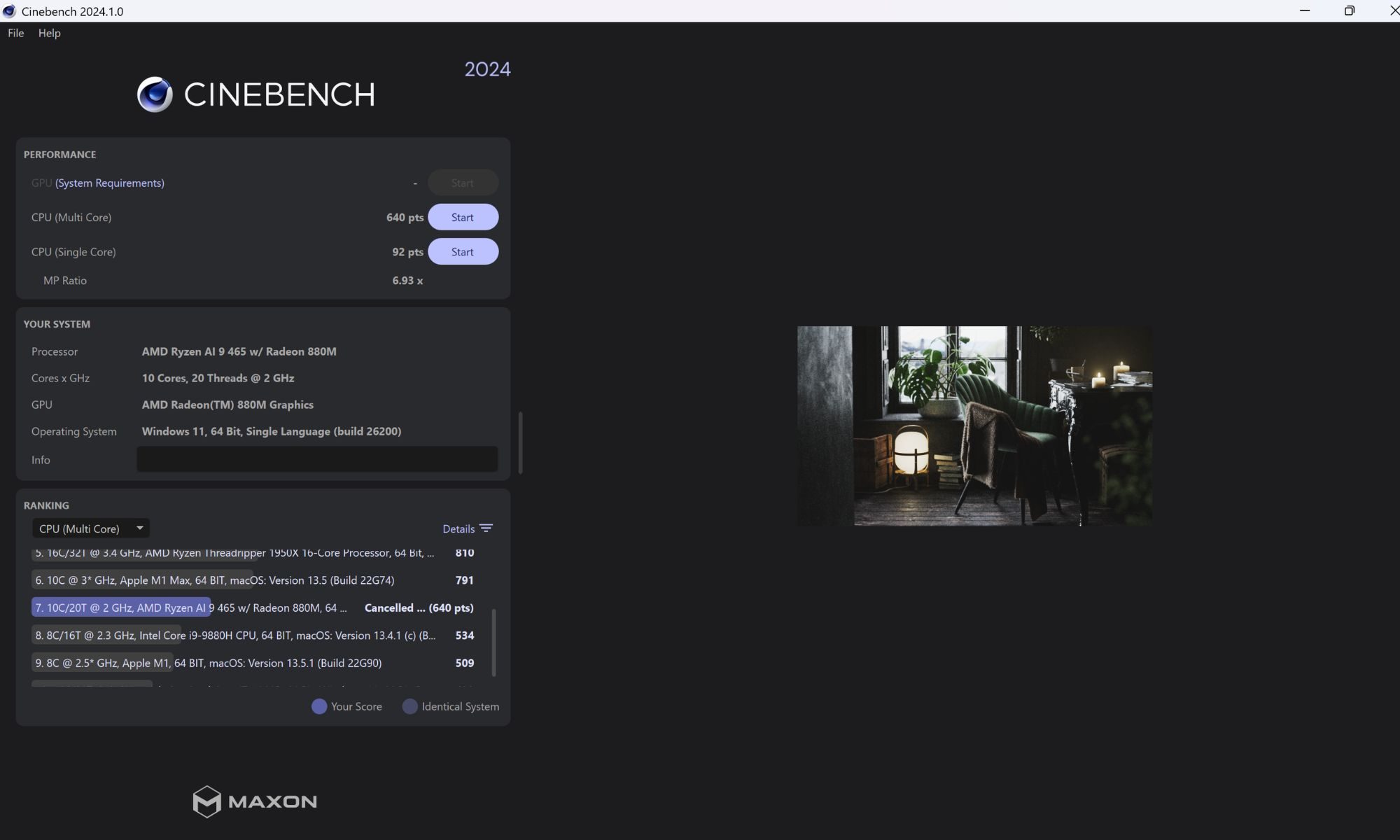
Starting with CPU performance, Cinebench 2024 provides a useful baseline. The Zenbook S16 scores 92 points in single-core and 640 points in multi-core. The single-core result is where the laptop shines. Day-to-day tasks feel quick and responsive, whether you are juggling multiple browser tabs, editing images, or working across several applications.
The system rarely feels sluggish, and most interactions happen without delay.
To better understand where the Ryzen AI 9 465 stands, it helps to look at Cinebench 2024 scores across competing platforms.
Moving to Apple’s M5 chip, it delivers the strongest balanced performance here, scoring 197 in single-core and 1126 in multi-core. This highlights its excellent efficiency and sustained output. The Snapdragon X2 Elite (X2E-88-100) follows with 149 single-core and 1467 multi-core, showing strong parallel performance, particularly in multi-threaded workloads.

Intel’s offerings are split into two distinct tiers. The Core Ultra 7 356H scores 122 single-core and 1093 multi-core, placing it close to Apple in multi-core, but behind in single-core responsiveness. Meanwhile, the Core Ultra 9 275HX pushes much higher with 129 single-core and 1944 multi-core, clearly designed for high-performance laptops with fewer thermal constraints.

In comparison, the Ryzen AI 9 465 scores 92 in single-core and 640 in multi-core, placing it noticeably behind across both metrics. This gap reflects not just raw capability, but also the power and thermal limits of the system it operates in. The multi-core score, however, reveals the limits of the platform.
A score of 640 points for a 10-core processor is respectable, but it is not pushing the hardware anywhere close to its potential. This suggests the processor is operating within a tight thermal and power envelope. Under sustained workloads such as video rendering or prolonged exports, performance reaches a steady state fairly quickly instead of scaling higher. This is not a weakness of the chip itself, but a clear indication of how the system has been tuned.
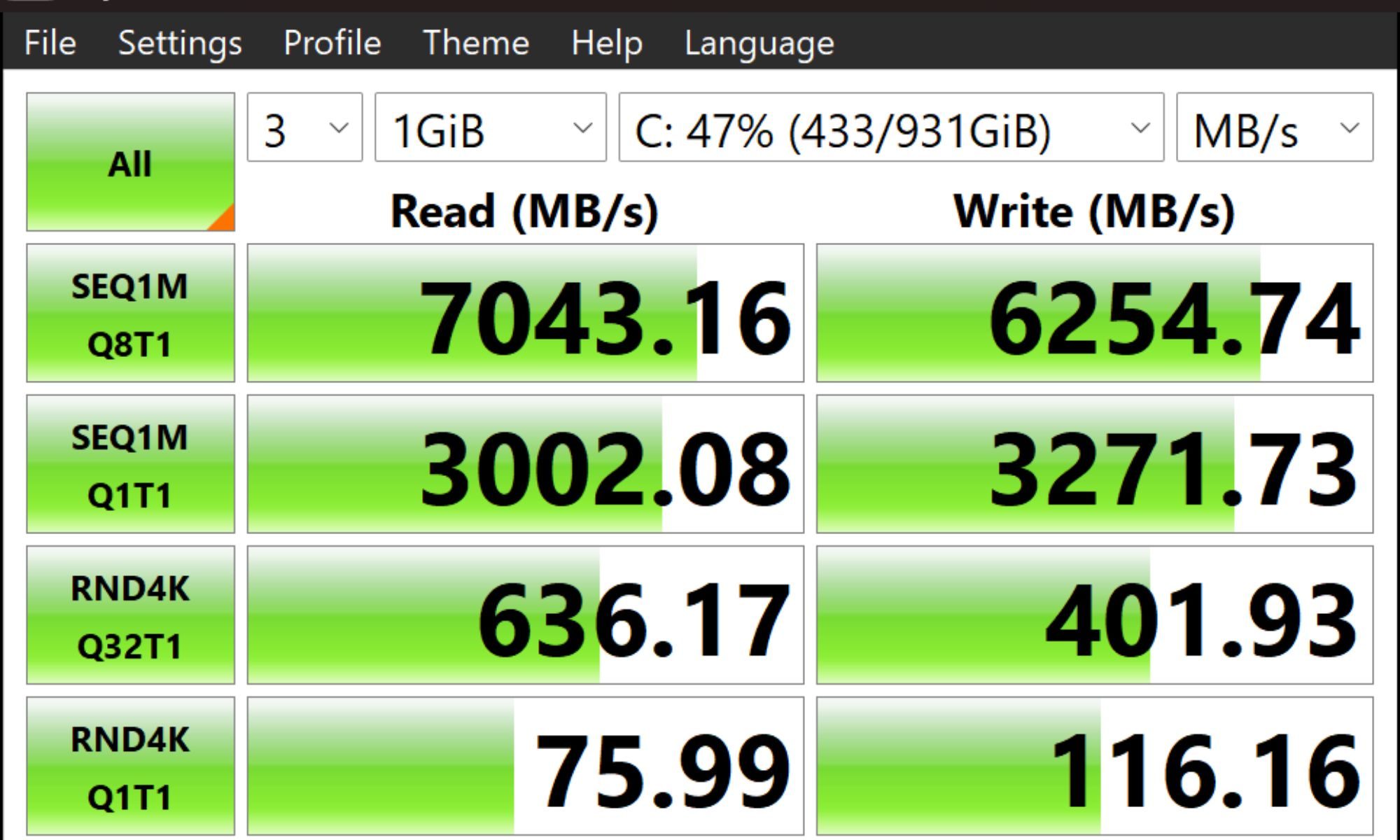
Storage performance, tested using CrystalDiskMark 9.0.2, is one of the strongest aspects of the Zenbook S16. Sequential speeds reach 7043 MB/s for reads and 6254 MB/s for writes, which is exactly what you would expect from a good PCIe 4.0 SSD.
Random performance sits at roughly 75 to 78 MB/s for reads and 116 to 127 MB/s for writes in 4K Q1T1 tests. These numbers are solid, though not exceptional. In real-world usage, the system feels consistently fast when launching applications or transferring files, but it does not quite reach the ultra-snappy responsiveness seen on top-tier desktop-class drives.
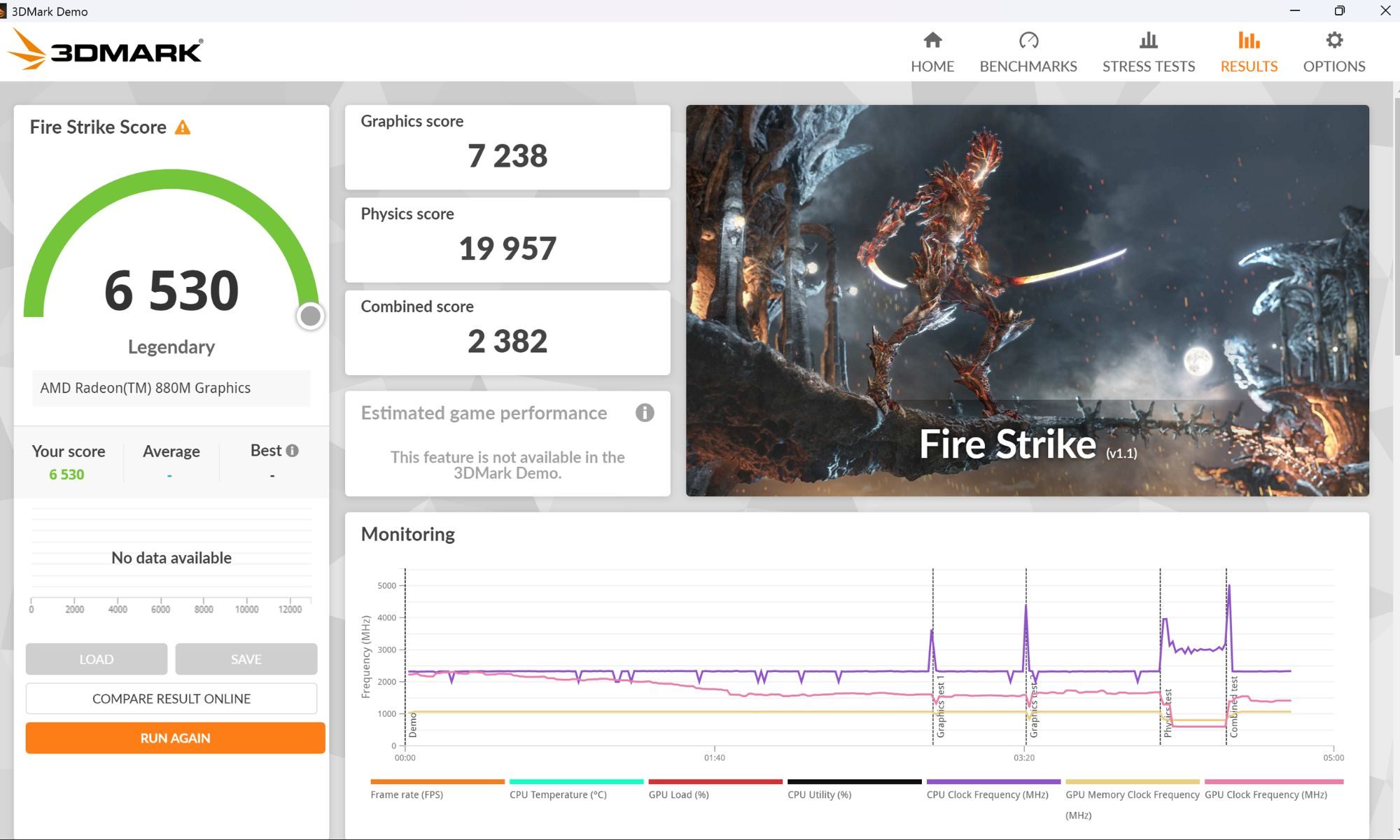
On the graphics side, the integrated Radeon 880M performs well within the expectations of an iGPU. In 3DMark Fire Strike, the system achieves a score of 6530, with a graphics score of 7238. This is a strong result for integrated graphics and indicates that lighter gaming workloads and esports titles are well within reach. Moving to 3DMark Time Spy, the system scores 3207 overall and 2900 in graphics. This paints a more realistic picture of modern performance, placing the laptop in the range of playable 1080p gaming at low to medium settings.
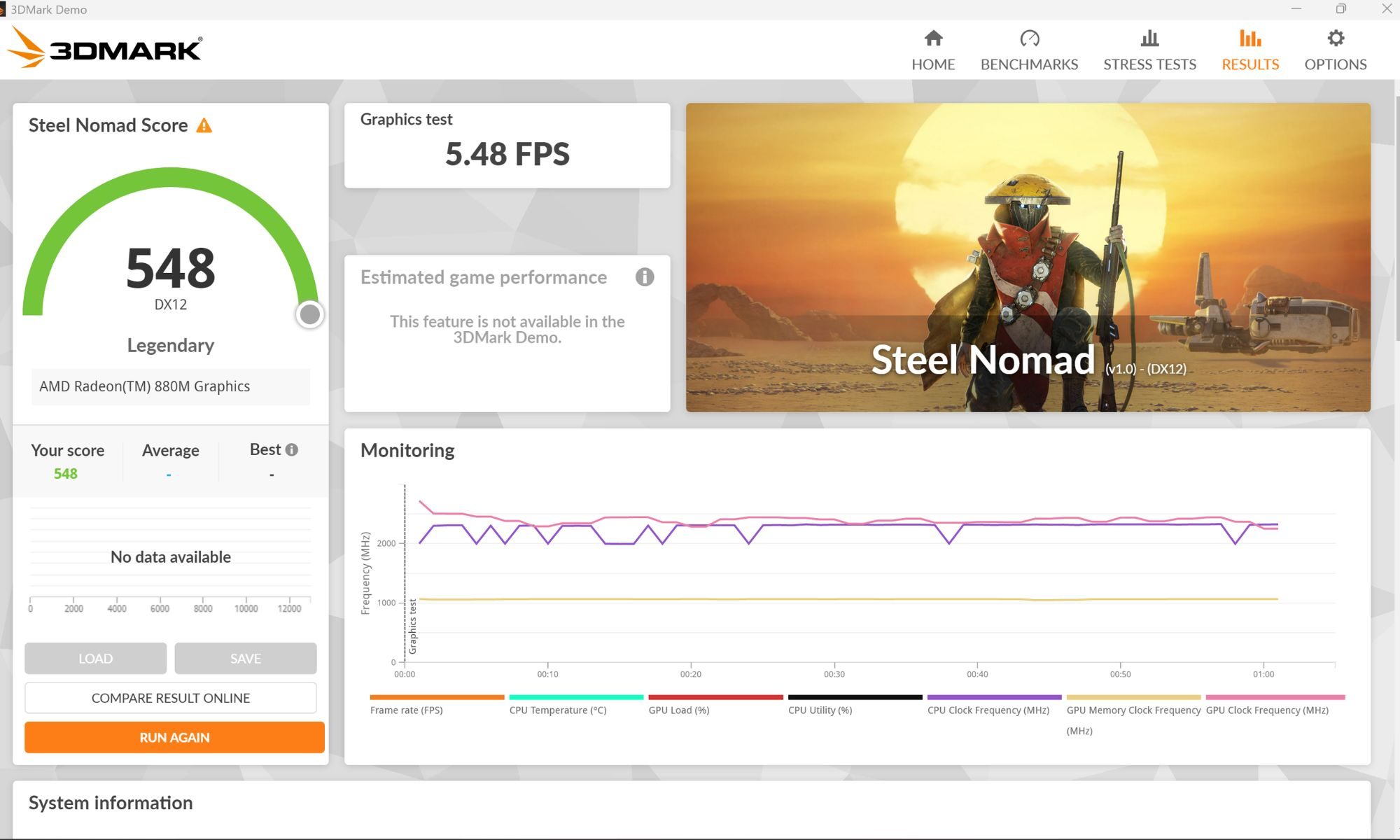
When pushed further, the limitations become more obvious.
In 3DMark Steel Nomad, the system scores 548 with an average of 5.48 frames per second, while 3DMark Solar Bay Extreme returns a score of 1225 at around 8.57 frames per second. These are significantly more demanding tests, and the results highlight the ceiling of integrated graphics in a thin-and-light chassis. The GPU is capable, but it is not built for sustained high-end gaming or heavy rendering workloads.

Thermal behaviour reinforces this pattern. During extended testing, CPU temperatures typically hover between 65 and 70 degrees Celsius, while GPU utilisation frequently sits at 100 percent under load. Clock speeds fluctuate instead of maintaining peak boost levels, indicating controlled performance scaling. There are no sharp drops or aggressive throttling events, but there is also no attempt to sustain maximum performance over longer durations.
This approach results in a system that feels stable and predictable. It does not overheat, fan noise remains moderate, and surface temperatures stay within comfortable limits. However, this stability comes at the cost of performance headroom. The Zenbook S16 consistently chooses to operate within safe limits rather than push the hardware harder.
On the software side, the laptop runs Windows 11, supplemented by ASUS utilities such as MyASUS and ScreenXpert. These tools provide access to performance modes, battery management, and display settings. While useful, they also overlap with existing Windows features, which can make the experience feel slightly redundant. The AI features, including NPU-backed tasks and Copilot integration, are present but do not yet play a significant role in everyday workflows.
Performance score: 7/10
Asus Zenbook S16 OLED battery life & charging: Reliable, but not class-leading
The Zenbook S16 packs an 83Wh battery, which is on the higher side for a thin-and-light laptop. On paper, that sounds promising, especially when paired with a 28W-class processor that is clearly tuned for efficiency.
In real-world use, the battery performance is good, but not class-leading.
For typical productivity workloads, which include browsing, writing, streaming, and some light editing, you can expect around 10 to 12 hours of usage. That is with the display set to a comfortable 70 per cent brightness and performance mode kept as balanced. Push the brightness higher or start leaning on heavier workloads, and that number drops fairly quickly.
The OLED display plays a big role here. While it looks fantastic, it is not the most power-efficient panel, especially at higher brightness levels or when displaying lighter content. Dark mode helps, but it is not a miracle fix. The high-resolution 3K panel also adds to the power draw, particularly when running at 120Hz.
Under heavier use, such as light video editing or sustained multitasking or gaming, battery life can dip closer to the 5 to 6 hour range. Gaming, even on the integrated GPU, will drain it much faster. This is expected, but worth keeping in mind if you plan to use it unplugged for anything beyond basic tasks.
Charging is handled via a 68W USB-C adapter, and this is where the experience is more convenient than impressive. It supports USB-C Power Delivery, so you can charge it with compatible third-party chargers or even power banks. That flexibility is useful. However, charging speeds are not particularly fast. Getting from low battery to a full charge takes a bit of patience.
There are also battery health features available through ASUS’s MyASUS app, including charge limits to preserve long-term battery lifespan. These are useful additions, especially if you plan to keep the laptop plugged in frequently.
Overall, the battery life is solid and reliable for everyday use, but it does not stand out. It is good enough to get through most of a workday with moderate use, but not something that redefines endurance in this category.
Battery score: 8/10
Should You Buy It?
If your priority is portability, design, and a large OLED display, the ASUS Zenbook S16 OLED Laptop makes a strong case. It delivers a rare combination of a 16-inch form factor in a genuinely lightweight chassis, backed by a sharp 3K OLED panel and solid everyday performance. For productivity users, writers, and hybrid workers, this is a very easy laptop to live with.
However, this is not a universal recommendation.
The performance numbers tell a clear story. The Ryzen AI 9 465 is fast in short bursts, but sustained workloads hit a ceiling quickly. The Radeon integrated graphics are capable of casual gaming and light creative work, but they are not built for anything demanding. This aligns with its design philosophy, but also defines its limitations.
Battery life is decent, not exceptional, and the glossy OLED panel can be restrictive in bright environments. The touchscreen also feels more like a spec sheet addition than a meaningful feature in daily use.
So, should you buy it?
Yes, if you want a premium, large-screen ultrabook that is light, efficient, and well-built. It stands out in that niche and does it better than most.
No, if you expect sustained performance, serious gaming, or workstation-level output. This is not that machine.
In simple terms, it is excellent at what it is designed to be, and equally clear about what it is not.
Alternatives you can try
If you are considering alternatives to the Zenbook S16 in the North American market, three clear competitors stand out, each taking a slightly different approach to the same thin-and-light, large-screen category.
- The MacBook Air 15-inch (M3/M5 class) is the most refined option here, prioritising efficiency, battery life, and sustained performance. Apple’s silicon delivers consistent output even in a fanless design, making it a more reliable choice for long workloads, though it lacks an OLED display and offers limited port selection.
- The Surface Laptop 7 (15-inch, Snapdragon X Elite) represents a more forward-looking direction, focusing heavily on AI capabilities and exceptional battery life. It runs silently and feels modern, but ARM-based compatibility issues and weaker GPU performance make it less versatile for certain users.
- The LG Gram 16 OLED is the closest philosophical match to the Zenbook S16, offering a large OLED display in an extremely lightweight chassis. It excels in portability and screen quality, but its build does not feel as premium, and performance tuning remains conservative. Taken together, these options highlight where the Zenbook S16 fits in the market.
It does not lead in any single category, but instead balances several strengths, including a high-quality OLED display, capable integrated graphics, strong port selection, and a premium design. That balance is ultimately its biggest advantage, even if each competitor manages to outperform it in specific areas.
How we tested it
I used the Zenbook S16 as my primary machine for a little over two weeks, treating it exactly the way most people would a daily work laptop. That meant a mix of travel and desk use, switching between battery-powered sessions on the move and plugged-in performance at home. During this period, the laptop was used across multiple environments, including cafes, flights, and hotel rooms, with consistent WiFi connectivity throughout. While I did not use it outdoors, a significant portion of the testing happened in brightly lit spaces with plenty of natural light, which helped evaluate display visibility and overall usability in less-than-ideal lighting conditions.
My usage was not limited to basic productivity. Alongside routine work such as writing, browsing, and handling multiple tabs and applications, I also pushed the system with light video editing tasks and occasional gaming sessions. Media consumption was also part of the routine, including streaming and general entertainment use. The idea was to simulate a realistic workload that reflects how a modern thin-and-light laptop is actually used, rather than isolating it to benchmarks or controlled scenarios.
Over the course of this testing period, the Zenbook S16 was expected to handle everything from casual multitasking to slightly more demanding tasks, all while adapting to different environments and power conditions. In short, this was not a lab test. It was used as a real-world, everyday machine to understand how well it holds up when it has to do a bit of everything.
